
Umso Review 2026: The Website Builder Built for Startups
Umso takes a different approach to website building. Instead of handing you a template and an editor, it generates a unique landing page based on your business description and design preferences. The result is a fast, clean, startup-ready page, though the platform's niche focus means it lacks the breadth of larger builders. Umso holds a strong 4.9 out of 5 on Trustpilot, albeit from a relatively small pool of 121 reviews. We tested the platform thoroughly to see how it holds up in practice.
Overview
Umso positions itself squarely in the startup lane. While most website builders try to serve everyone from bloggers to enterprise retailers, Umso has a narrower mission: help founders and small teams launch professional landing pages as quickly as possible. The platform was designed from the ground up for the startup workflow. Describe what your company does, make a few design choices, and get a professional-grade page that is ready to share with investors, early customers, or Product Hunt. There are no sprawling dashboards, no plugin marketplaces, and no ecommerce modules to wade through.
How the Landing Page Generator Works
At the heart of Umso is its landing page generator. Rather than offering a gallery of pre-made templates, the system creates a design specifically for your project based on the information you provide. You describe your product, select layout preferences, and the generator assembles a page with appropriate sections: hero areas, feature grids, testimonial blocks, pricing tables, and call-to-action buttons. The output is a static page built with clean HTML and CSS, hosted on a content delivery network for fast load times worldwide. This generator-based approach sets Umso apart from template-driven builders and gives each site a slightly more custom feel without requiring any design skills.
Built for Startup Teams
Umso also ships with features that matter specifically to startup teams: multilingual support powered by an AI Translation Manager, GDPR-compliant cookie solutions for European audiences, built-in blog functionality, custom forms for lead collection, and (critically) site export so you can take your code with you if you outgrow the platform. The pricing is per-site, which keeps costs transparent but can add up for agencies or founders running multiple projects. In this review, we break down every aspect of the platform to help you decide whether Umso is the right launchpad for your next project.
Free Plan Details
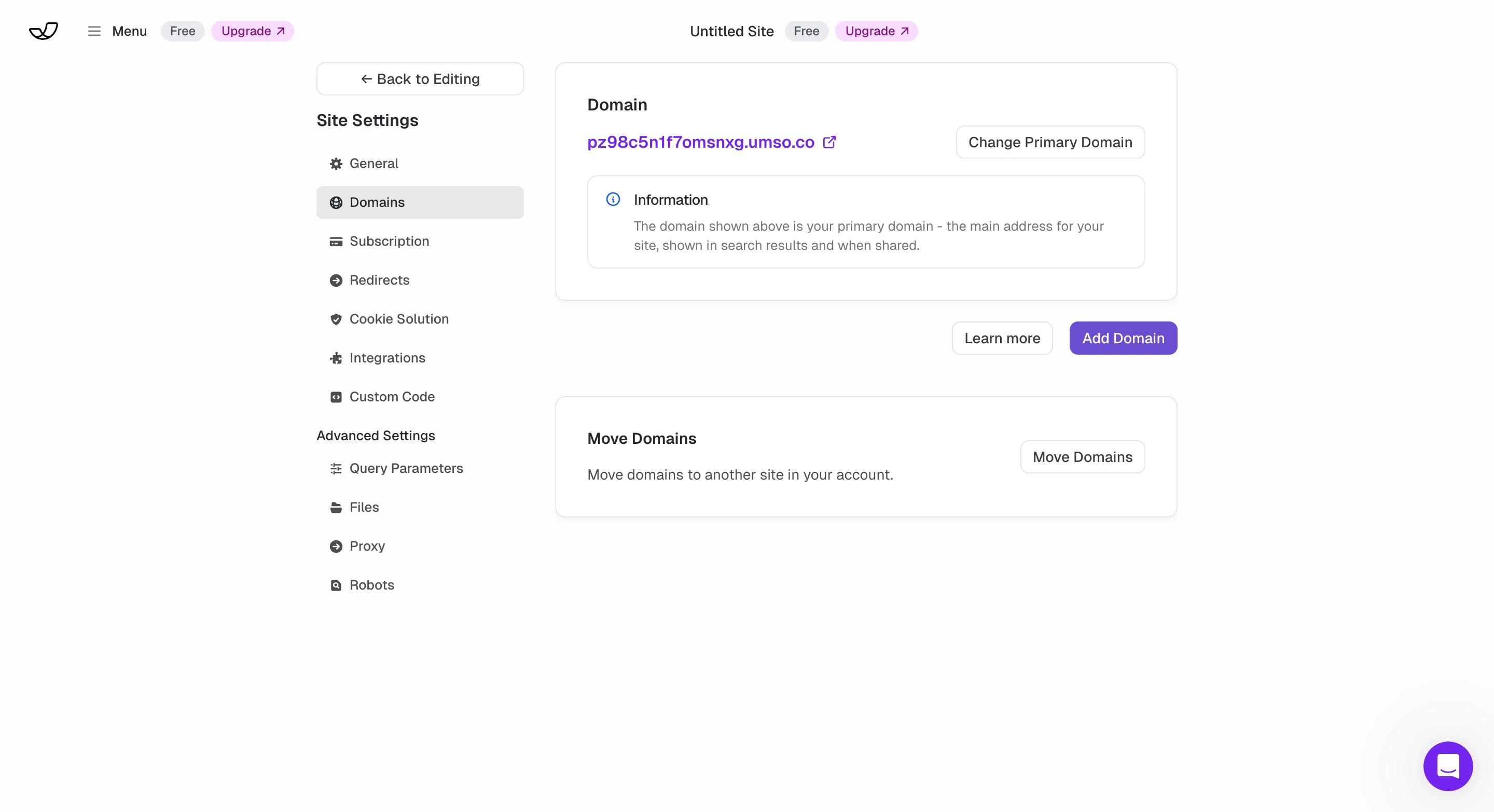
Umso's free plan gives you a single homepage published on an Umso subdomain (yoursite.umso.com). You also get access to the built-in blog and basic analytics, so you can publish content and track visitor numbers without spending a cent. There is no time limit on the free plan, meaning your homepage stays live indefinitely. That makes it a reasonable option for a startup that wants to test messaging or gauge interest before investing in a paid tier.
Free Plan Limitations
- No custom domain: your URL will always carry the Umso branding
- Single page only: no room for about, pricing, or multi-page structures
- No custom forms or advanced analytics (reserved for paid plans)
- No multilingual content at this tier
The free plan is best understood as a preview of what Umso can do. It lets you experience the generator, publish a real page, and decide whether the platform fits your needs before committing financially. Compared to free tiers from builders like Wix or Carrd, Umso's offering is more focused but also more limited in scope. You get fewer pages and no custom domain, but the page you do get loads faster and ships with cleaner code. For a founder who needs a single landing page to validate an idea, the free plan is actually useful. For anything more, an upgrade to the Pro plan ($25/mo, or $20/mo billed annually) will be necessary.
Ease of Use
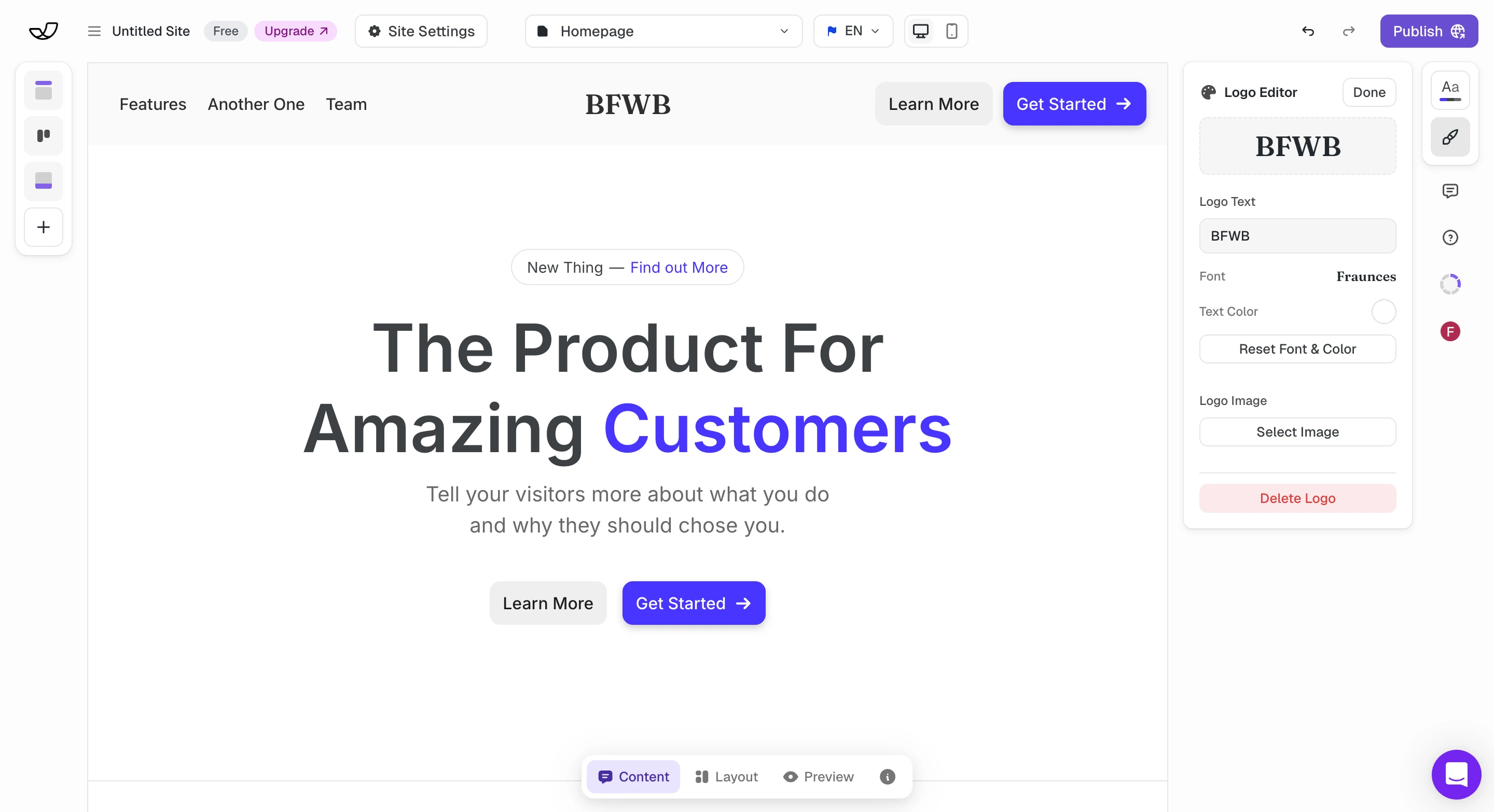
Getting started with Umso is refreshingly fast. After signing up, the landing page generator walks you through a series of questions about your product, your target audience, and your visual preferences. Based on your answers, it assembles a complete page with relevant sections, placeholder copy, and a cohesive color scheme. The whole process takes about five to ten minutes, and you end up with a page that looks like it was designed by someone who knows what they are doing, even if you have never built a website before.
A No-Fuss Editor
The editor itself is painless to use. Click on any element to edit text inline, swap images by clicking on them, and rearrange sections by dragging them into a new order. Adding new sections is handled through a panel that offers common startup page components: feature lists, testimonial carousels, team bios, pricing tables, FAQ blocks, and more. There are no confusing layer systems or nested menus. The interface stays out of your way and lets you focus on content, which is exactly what most startup founders need.
Power users may find the editor limiting. There is no pixel-level positioning, no advanced animation controls, and no ability to inject arbitrary HTML or JavaScript without upgrading to the Pro plan. The generator makes strong opinions about layout and spacing, and while the results are consistently professional, deviating from the generated structure requires working within the tool's constraints. For the vast majority of landing pages, this trade-off is well worth it: you get speed and a professional finish at the cost of granular control.
Design & Templates
Umso does not have a traditional template gallery, and that is by design. The landing page generator creates a unique layout for each project based on your inputs, which means you never start from a template that thousands of other websites are also using. The generated designs lean toward the modern SaaS aesthetic: clean typography, generous whitespace, bold hero sections, and tasteful gradients. If your startup fits within the tech or SaaS space, the output will feel immediately on-brand. For businesses outside that niche (a restaurant, a fitness studio, or a creative agency), the designs may feel less tailored to your industry.
Customization Options
Customization sits in a middle ground between minimal and comprehensive. You can adjust colors, fonts, and background images at the section level, and global style settings let you apply a consistent palette across the entire page. Section layouts offer several variations: you might choose between a two-column feature grid and a three-column version, or between a centered hero and a split layout with an image on the side. You cannot, however, freely drag elements around the canvas, create entirely custom layouts, or add custom CSS without the Pro plan.
The quality of the generated designs is consistently high. Because Umso controls the layout engine tightly, the output avoids the common pitfalls of drag-and-drop builders: misaligned elements, inconsistent spacing, and mobile layouts that break. Every page we generated during testing looked clean on both desktop and mobile without any manual adjustment. The tradeoff is that Umso sites share a recognizable visual language, and experienced designers may find the creative ceiling too low. For most startup landing pages, though, the generator produces results that would cost hundreds of dollars if commissioned from a freelancer.
Features
Umso's feature set is curated rather than exhaustive, reflecting the platform's startup focus. The built-in blog lets you publish articles and updates without needing a separate CMS, which is useful for content marketing and SEO. Custom forms on paid plans support lead collection: you can create signup forms, contact forms, and waitlist forms that feed directly into your workflow. The form builder includes customizable fields and redirect URLs, covering the basics that most landing pages need for lead generation.
AI Translation Manager
The AI Translation Manager is one of Umso's standout features. Available on the paid Pro plan, it lets you create multilingual versions of your site with AI-assisted translation, which is useful for startups targeting international markets. Instead of manually duplicating pages and translating each one, you can manage all language versions from a single interface. The translations are not perfect (machine-translated content rarely is), but they provide a strong starting point that you can refine. The workflow is far more efficient than building separate sites for each language.
Other Features Worth Noting
- GDPR-compliant cookie consent built into the platform
- Site export: download your code and deploy it elsewhere (surprisingly rare)
- Advanced analytics on paid plans for deeper visitor insights
What Umso lacks is breadth. There is no app marketplace, no membership functionality, no booking system, and no integration network comparable to what Wix or Squarespace offer. If your landing page needs extend beyond content, forms, and a blog, you will need to look elsewhere or integrate external tools manually.
SEO Tools
SEO is an area where Umso performs well relative to its size and scope. The platform generates static HTML pages, which means search engine crawlers receive clean, lightweight markup with no client-side rendering dependencies. Pages are served from a CDN, resulting in fast load times that contribute positively to Core Web Vitals scores (a confirmed Google ranking factor). The code output uses proper semantic HTML with appropriate heading hierarchy, alt text support for images, and structured meta tags. These technical foundations put Umso ahead of several larger builders whose pages are weighed down by JavaScript-heavy frameworks.
Content-Level SEO Controls
On the content side, you can customize page titles, meta descriptions, and Open Graph tags for social sharing. The blog supports individual post URLs with clean slugs, which is important for content-driven SEO strategies. The Pro plan unlocks more granular control, including custom code injection where you can add structured data markup or analytics scripts. The combination of fast hosting, clean code, and reliable on-page SEO controls means that a well-optimized Umso landing page has a realistic chance of ranking for low-to-medium competition keywords.
The limitations are mostly around advanced SEO tooling. There is no built-in SEO audit or checklist like Wix offers, no automatic sitemap submission tool, and no native integration with Google Search Console. You also cannot set up custom redirects on the free plan or configure canonical URLs for duplicate content management. For a startup landing page targeting a handful of keywords, Umso's SEO tools are more than adequate. For a content-heavy site competing in saturated search markets, you would benefit from a platform with deeper SEO infrastructure.
Ecommerce
Ecommerce is not part of Umso's proposition. The platform does not include any built-in store functionality, product listings, shopping carts, or payment processing. This is a deliberate design decision rather than an oversight. Umso is built for landing pages and startup websites, not for selling physical or digital products. If you need to accept payments or manage an inventory, Umso is simply not the right tool.
That said, you can work around this limitation to some degree. On the Pro plan, which supports custom code injection, you could embed a third-party payment widget from Stripe, Gumroad, or LemonSqueezy to handle transactions. You could also link out to an external store or checkout page. These are workarounds rather than features, though, and they will never match the integrated experience of a platform like Shopify, Squarespace, or even Wix's ecommerce features. If selling online is anything more than an afterthought for your business, you need a different builder.
Pros and Cons
Pros
- Landing page generator creates unique designs based on your input rather than offering static templates
- Static pages hosted on a CDN deliver excellent page load speeds
- Clean, semantic code output with built-in SEO fundamentals
- AI Translation Manager enables multilingual sites with minimal effort
- Site export functionality lets you take your code and host it elsewhere
- GDPR-compliant cookie solutions built in, well-suited to European startups
- Free plan includes a homepage and blog at no cost
Cons
- Free plan limited to a single homepage on an Umso subdomain
- No ecommerce features, so you cannot sell products or accept payments
- Smaller user community and fewer third-party resources than major builders
- Custom domain requires upgrading to the Pro plan ($25/mo or $20/mo annual)
- Per-site pricing means costs add up if you manage multiple projects
- Design flexibility is constrained by the generator's output options
- Not suited for large, content-heavy websites or complex web applications
- Trustpilot score is strong (4.9/5) but based on only 121 reviews, a small sample compared to established builders
Umso Pricing
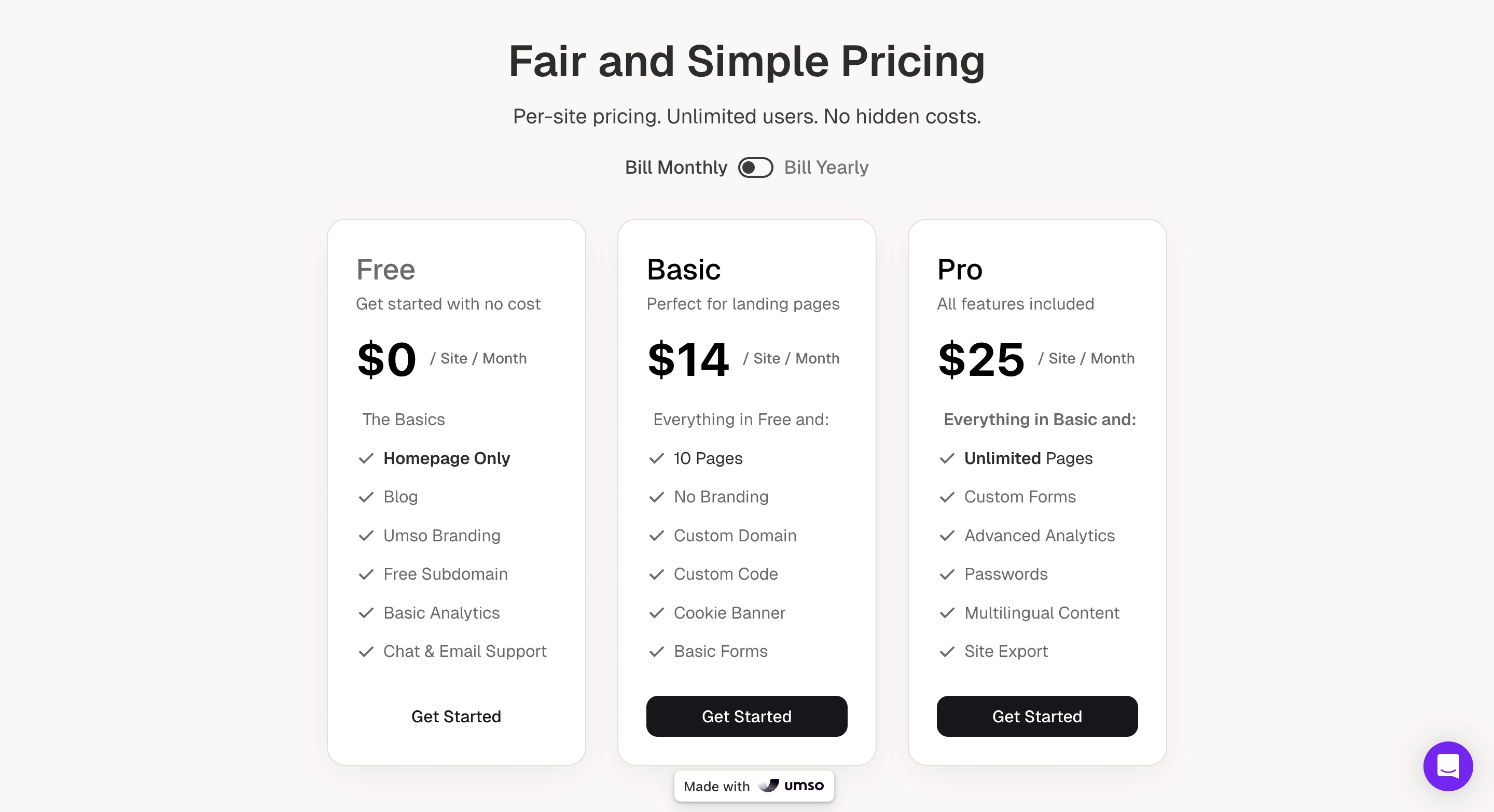
| Plan | Monthly | Annual (per mo) | Key Features |
|---|---|---|---|
| Free | $0 | $0 | Homepage only, blog, basic analytics, Umso subdomain |
| Pro | $25/mo | $20/mo | All features: unlimited pages, custom domain, custom forms, advanced analytics, multilingual, AI Translation Manager, custom code, site export |
All prices are per site. Umso uses a simplified two-tier pricing structure: a free plan and a single Pro plan that unlocks all features. Annual billing drops the Pro plan from $25 to $20 per month, which is competitive for what you get. There are no hidden costs, transaction fees, or complicated tier gates. The Pro plan includes CDN hosting, SSL certificates, custom domain, and site export functionality.
Final Verdict
Umso occupies a clearly defined niche and serves it well. If you are a startup founder, a solo maker, or a small team that needs a fast, professional landing page without the overhead of a full-featured website builder, Umso delivers. The landing page generator produces solid designs in minutes. The static CDN hosting ensures your page loads quickly everywhere. The clean code output means you are not building on a foundation of JavaScript bloat. And the site export feature gives you an exit strategy that most competitors do not offer, a detail that matters when you are building on a third-party platform.
Umso's 4.9 out of 5 Trustpilot score from 121 reviews is encouraging, with users praising the ease of use and responsive support. However, that review pool is small compared to the thousands of reviews that established builders like Wix or Squarespace accumulate. The weaknesses are the flip side of the platform's focus: no ecommerce, a limited free plan, a smaller support ecosystem, per-site pricing, and less design flexibility than template-driven builders like Wix or Squarespace. If your needs grow beyond landing pages and a blog, you will eventually outgrow Umso, though the export feature at least makes that transition smoother. Our score of 3.7 out of 5 reflects a platform that delivers well on its intended purpose, backed by positive (if limited) user feedback, but too specialized for general-purpose website building.
Frequently Asked Questions
Is Umso really free?
Who is Umso best suited for?
Can I export my Umso website?
How does Umso's landing page generator work?
How does Umso compare to Wix or Squarespace?
Trustpilot Score
Based on 121 reviews on Trustpilot
Umso holds a 4.9 out of 5 rating on Trustpilot as of March 2026, with 97% of reviewers awarding five stars. Users consistently praise the ease of use, the quality of generated designs, and the responsiveness of the support team. Several reviewers mention using the platform for five or more years, which suggests strong retention. The main caveat is sample size: 121 reviews is a small pool compared to the tens of thousands that larger builders like Wix or Squarespace receive. While the overwhelmingly positive sentiment is a good sign, it is worth noting that niche platforms with smaller user bases tend to attract more engaged (and often more satisfied) reviewers, which can skew scores upward.
Read all reviews on TrustpilotOur Hands-On Experience
We tested Umso by building a landing page for a fictional SaaS startup and exploring the free and Pro plan features. The landing page generator delivered on its core promise: after answering a series of questions about our product, target audience, and visual preferences, we had a credible startup landing page live quickly. The generated design included a hero section, feature grid, testimonial block, pricing table, and a call-to-action footer, all with reasonable placeholder copy and a cohesive color palette.
Editing the generated page was straightforward. Inline text editing worked as expected, image swaps were painless, and reordering sections via drag-and-drop felt snappy. We were impressed by how consistently professional the output looked on both desktop and mobile without any manual responsive adjustments. The static page loaded noticeably faster than equivalent test pages we built on Wix and Squarespace, which aligns with the CDN-hosted static HTML approach.
The free plan's limitations became clear quickly. Being restricted to a single homepage on an Umso subdomain is fine for a quick proof of concept, but we needed the Pro plan to test custom forms, multilingual content, and custom code injection. The simplified two-tier pricing (free and $25/mo Pro) is refreshingly transparent compared to the multi-tier structures of larger competitors. The AI Translation Manager worked well for generating draft translations of our page into French and German, though we noticed some awkward phrasing that would need manual refinement for a production site.
The biggest limitation we encountered was design flexibility. While the generator's output was consistently polished, deviating from its layout decisions was difficult. We wanted to create a custom section layout that did not match any of the available presets, and there was no way to achieve it without custom code. The site export feature worked cleanly: we downloaded a ZIP of static HTML, CSS, and assets that deployed without issues on Netlify. For a startup that might outgrow the platform, that exit path is genuinely valuable and surprisingly rare among website builders.