
Tilda Review 2026: Block-Based Website Builder with Free Plan
Tilda is a Russian-founded website builder that has gained a following among designers and content creators for its block-based approach to web design. Rather than dragging individual elements around a canvas, you assemble pages from pre-designed content blocks, and the visual results can be impressive. We tested the platform extensively, from the free plan to the Zero Block editor, to see how it holds up against mainstream builders. While Tilda scores a strong 4.5 out of 5 on Trustpilot from 88 reviews, the free plan has notable restrictions and the company's Russian origins may be a concern for some users.
Overview
Tilda Publishing was founded in 2014 in Moscow by Nikita Obukhov and has grown into one of the more design-focused website builders on the market. It is worth noting upfront that Tilda is a Russian company, and some user data may be processed on servers located in Russia. The company has since established entities in other jurisdictions including the UAE, and states that it follows GDPR standards, but users who are sensitive to data residency should factor this into their decision. The platform takes a fundamentally different approach to site creation compared to mainstream builders like Wix or Squarespace. Instead of offering a blank canvas where you place individual elements, Tilda provides a library of over 600 professionally designed content blocks. These are pre-built page sections covering headers, features lists, team introductions, pricing tables, testimonials, galleries, and dozens of other common website patterns. You stack these blocks vertically to compose complete pages, and the result is a level of visual quality that most users would struggle to achieve from scratch.
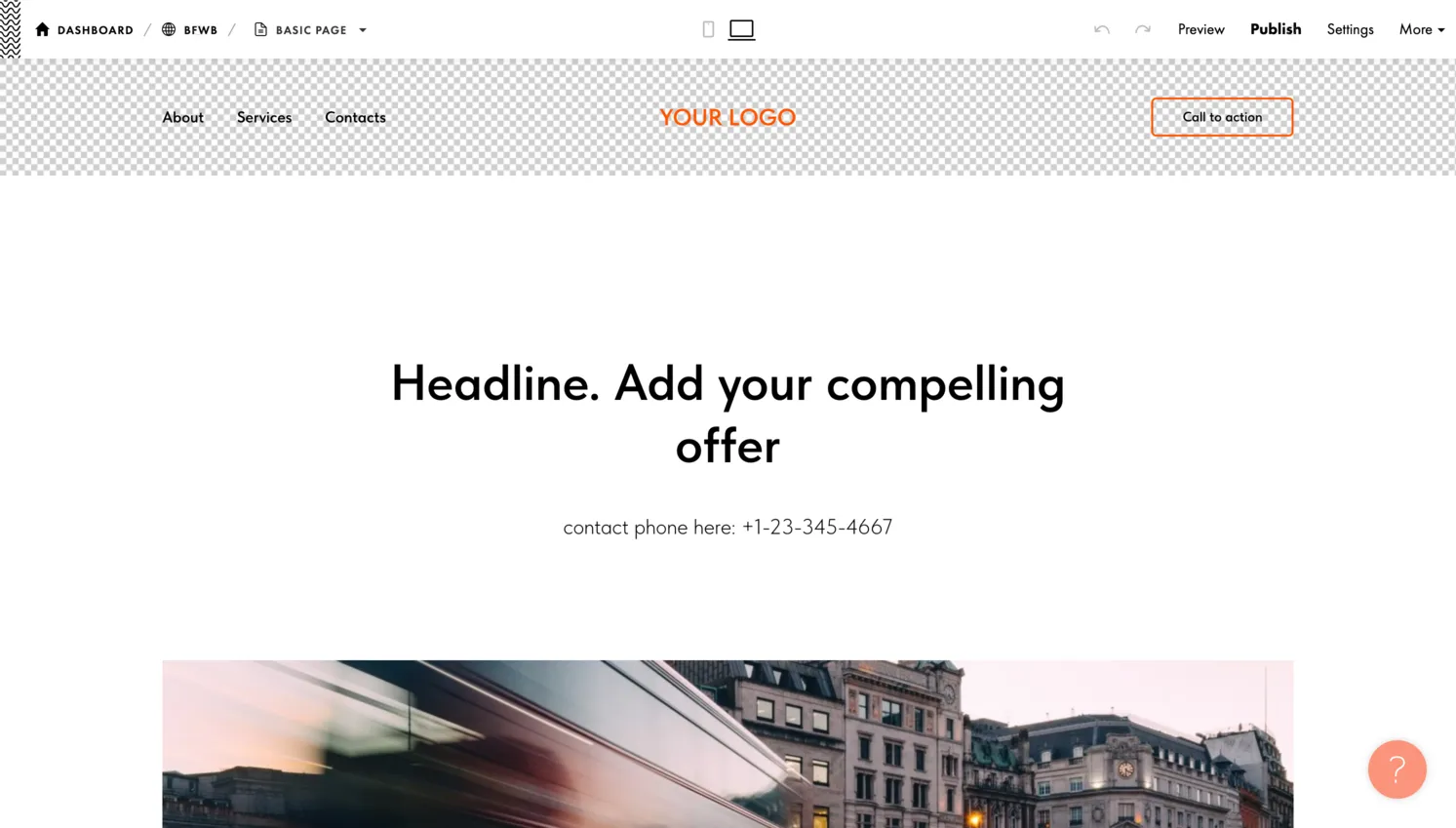
What sets Tilda apart from other block-based tools is the depth of its design system. Each block has been designed with attention to typography, spacing, and visual hierarchy, which means even a beginner can produce polished-looking pages without design experience. The platform is most popular among editorial teams, digital magazines, creative agencies, and marketers who need visually compelling landing pages. That said, Tilda's audience remains niche compared to Wix or Squarespace, and its block-based workflow is not for everyone.
For users who want to go beyond the pre-built blocks, Tilda includes Zero Block, a pixel-perfect design editor that lets you create entirely custom sections with freeform element placement, layering, and per-breakpoint responsive design. Zero Block is available on every plan, including the free tier, which is a genuinely useful inclusion. The combination of rapid block-based assembly for most of your site and Zero Block for hero sections or custom layouts gives Tilda more design flexibility than most builders in its price range, though it comes with a steeper learning curve than simpler platforms like SITE123 or Strikingly.
Free Plan Details
Tilda's free plan is more generous than many competitors when it comes to page limits. You can create one website with up to 50 published pages, which is significantly more than what most free website builders allow. The free tier includes:
- 100 blocks from Tilda's content library
- The Zero Block pixel-perfect editor
- Built-in animations, scroll effects, and responsive design for all screen sizes
- Basic analytics and fundamental SEO settings
No credit card is required to sign up, and the plan does not expire.
Free Plan Limitations
The main limitations are the 50MB storage cap, the absence of custom domain support, and a "Made on Tilda" label that appears on your site. The storage limit is tight, so you will need to optimize your images carefully and avoid uploading large media files directly. Your site will be hosted on a Tilda subdomain (yoursite.tilda.ws), which works for portfolios or experimental projects but looks unprofessional for a business website. The block library restriction to 100 blocks means you have access to the core essentials but not the full 600+ collection available on paid plans.
Compared to free plans from Wix or Google Sites, Tilda's free tier trades quantity of features for quality of design output. You get fewer built-in tools and integrations, but the pages you create will likely look better from a visual design standpoint. If your primary goal is producing a beautiful portfolio, a well-crafted landing page, or a content-rich microsite, Tilda's free plan delivers real value. If you need a custom domain, forms with CRM integration, or ecommerce capability, you will need to step up to the Personal plan.
Ease of Use
Tilda's learning curve falls somewhere between the simplicity of Strikingly and the complexity of Webflow. The block-based approach is conceptually simple: you browse the library, select a block that matches the section you want to add, drop it onto your page, and customize the content. The editor interface is clean and well-organized, with a left panel showing your page structure and a live preview of your site on the right. Editing text and images is inline, which means you click directly on the element you want to change and start typing or upload a replacement image.
Thinking in Sections
Where Tilda requires more learning than basic builders is in understanding its design philosophy. Because each block is a self-contained section with pre-defined layout rules, you need to think about your page in terms of sections rather than individual elements. This is different from the freeform approach of Wix, where you can place any element anywhere on the page. Some users find this liberating because the constraints prevent design mistakes. Others find it frustrating when they cannot make a small layout adjustment within a block. The settings panel for each block offers customization options for colors, typography, spacing, background images, and animations, but the range of adjustments varies from block to block.
Mastering Zero Block
Zero Block adds a significant layer of capability and complexity. It is essentially a full design tool nested within the website builder, offering precise pixel positioning, z-axis layering, independent breakpoint editing for desktop, tablet, and mobile, and keyframe-based animation controls. Beginners can ignore Zero Block entirely and build complete sites using only the standard blocks. Intermediate and advanced users, however, will find it indispensable for creating unique hero sections, custom navigation bars, or interactive visual elements. Zero Block does take some time to become comfortable with, but the investment pays off with design possibilities that few other builders can match.
Design & Templates
Design is Tilda's strongest suit and the primary reason most users choose the platform. The block library is extensive and meticulously crafted, with over 600 blocks organized into categories covering every common website pattern:
- Headers, about sections, and features
- Team members, testimonials, and pricing tables
- Contact forms, footers, galleries, video sections, counters, and schedules
Each block comes in multiple layout variations, so a "features" block might be available as a two-column grid, a three-column card layout, or a full-width alternating image-and-text format. The typographic choices, whitespace, and proportions in these blocks reflect real design expertise.
Page Templates and Aesthetics
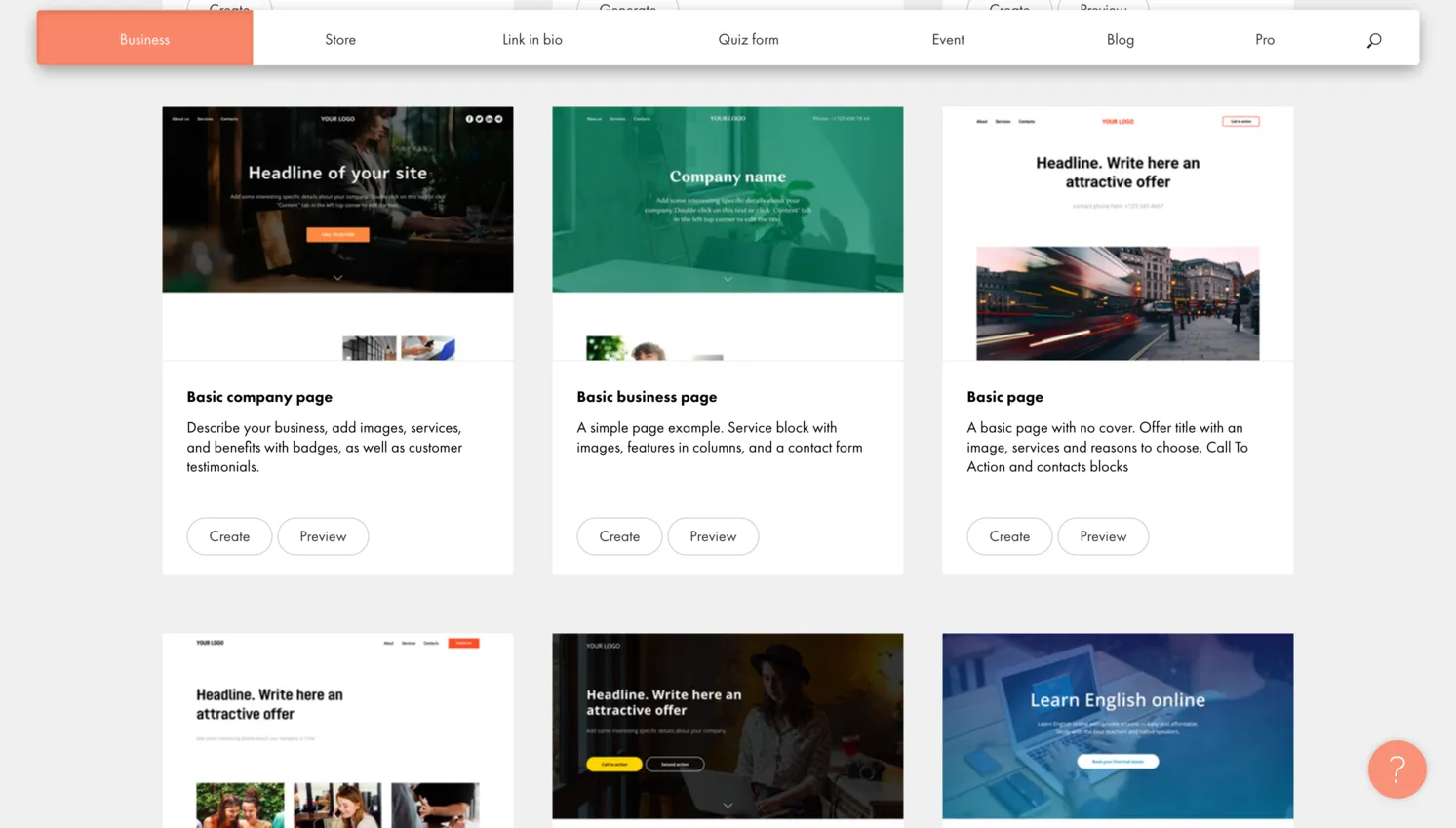
Tilda also provides complete page templates that combine multiple blocks into ready-made pages for specific purposes: landing pages, portfolios, about pages, blog layouts, and product showcases. These templates serve as starting points that you can modify by swapping blocks in and out, changing colors, adjusting typography through the global style settings, and replacing content. The overall aesthetic leans toward modern, editorial, and minimalist design, which makes Tilda a natural fit for creative professionals, media companies, and brands that prioritize visual storytelling.
Block System + Zero Block: Unmatched Design Power
The combination of the block system and Zero Block gives Tilda strong design capabilities. Standard blocks ensure consistency and speed. Zero Block lets you break free from templates entirely and create custom sections with precise positioning. The built-in animation system supports scroll-triggered effects, parallax backgrounds, fade-ins, slides, and more complex motion sequences within Zero Block. Tilda's design tools compare favorably to Squarespace and, in some respects, approach the flexibility of Webflow, though Zero Block has a meaningful learning curve and the block-based approach can feel rigid when you want a layout the library does not offer.
Features
Beyond its design tools, Tilda offers a well-rounded set of features for building functional websites. The platform includes a built-in form builder that supports a wide range of field types:
- Text inputs, dropdowns, checkboxes, file uploads, and phone numbers
- On paid plans, form submissions flow directly into Tilda's built-in CRM
- Lead management, contact segmentation, and interaction tracking
This tight integration between forms and CRM makes Tilda an especially strong choice for marketing teams and businesses that rely on lead generation through landing pages.
Blogging
Tilda's blogging capabilities are adequate for most content publishers. You can create blog posts with rich formatting, images, and embedded media, and the platform provides several blog layout blocks for listing and displaying articles on your site. The blog supports categories and is well-integrated with Tilda's design system, so your posts inherit the same visual quality as the rest of your site. The blogging tools do lack some features found in dedicated platforms, though: there is no built-in comment system, no scheduled publishing on the free plan, and limited post management compared to WordPress.
Additional Tools and Integrations
Additional features include built-in analytics that track page views and visitor behavior, email campaign tools on paid plans for sending newsletters directly from Tilda, integration with Google Analytics for deeper insights, custom fonts support on paid plans, and the ability to add custom HTML, CSS, and JavaScript code. Tilda integrates with popular third-party services including Mailchimp, Google Sheets, Telegram, and various payment processors. The integration catalog is more limited than what Wix offers through its App Market, but it covers the most common needs for marketing-focused websites. The free plan restricts several of these features, above all the CRM, email campaigns, and some advanced form options.
SEO Tools
Tilda provides a competent set of SEO tools that cover the fundamentals without venturing into advanced territory. You can set custom page titles, meta descriptions, and Open Graph tags for social media sharing on every page. Each page gets a clean, customizable URL slug, and Tilda automatically generates an XML sitemap for your site. All sites include SSL certificates by default, and the platform produces clean, semantic HTML that search engines can crawl efficiently. Pages built with Tilda's standard blocks tend to load quickly, and the platform scores well in Core Web Vitals tests when images are properly optimized.
Tilda also supports heading hierarchy control within blocks, alt text for images, and canonical URL settings, all of which are important for on-page SEO. On paid plans, you can connect Google Analytics and Google Search Console for performance monitoring. However, Tilda lacks some advanced SEO features that power users expect. There is no built-in SEO audit tool, limited structured data markup control beyond what is automatically generated, and no advanced redirect management interface. The SEO tools are sufficient for most personal and small business websites, and the fast page speeds are a clear advantage. If you are competing in highly competitive search niches, however, you may find the SEO toolkit less configurable than what Wix or WordPress offer.
Ecommerce
Tilda includes ecommerce functionality on its paid plans, and the implementation is clearly designed for content-first businesses that also want to sell products rather than for dedicated online retailers. The Personal plan supports up to 5,000 products, while the Business plan expands that to 50,000. You can create product catalog pages using Tilda's ecommerce blocks, which maintain the same design quality as the rest of the platform. Product pages support images, descriptions, pricing, and variants. Payments are processed through integrations with Stripe, PayPal, and several other regional payment providers.
Checkout and Weak Spots
The shopping cart and checkout experience is functional but no-frills. Customers can add items, review their cart, and complete the purchase without leaving your site. Order management is handled through Tilda's dashboard, and you receive notifications for new orders. Tilda's ecommerce does lack many features that serious store operators expect, however: no inventory tracking with low-stock alerts, no abandoned cart recovery, no product reviews or ratings system, limited shipping rule configuration, and no integration with fulfillment services. Tilda's store works well for creative professionals selling prints, digital downloads, courses, or a curated selection of products alongside content. For businesses where ecommerce is the primary focus, Shopify, WooCommerce, or even Wix Stores will provide a much more complete solution.
Pros and Cons
Pros
- Strong design quality with 600+ professionally crafted content blocks
- Zero Block editor provides pixel-perfect creative control for custom sections
- Free plan includes 50 pages, animations, and built-in analytics without a time limit
- Well suited for editorial, magazine-style, and storytelling websites
- Built-in CRM, forms, and email campaigns on paid plans
- Trustpilot users praise the intuitive interface and continuous platform improvements
Cons
- Russian-founded company with some data processed on servers in Russia, raising privacy concerns for some users
- Free plan does not support custom domains and forces Tilda branding in the footer
- Block-based approach has a learning curve compared to traditional drag-and-drop builders
- Free plan limited to 1 site, 50MB of storage, and only 100 of the 600+ blocks
- Ecommerce features are basic with no inventory alerts, abandoned cart recovery, or fulfillment integrations
- Trustpilot reviewers report that monthly plans still show "Made on Tilda" branding and that support can be slow
- Code export only available on the most expensive Business plan
Pricing
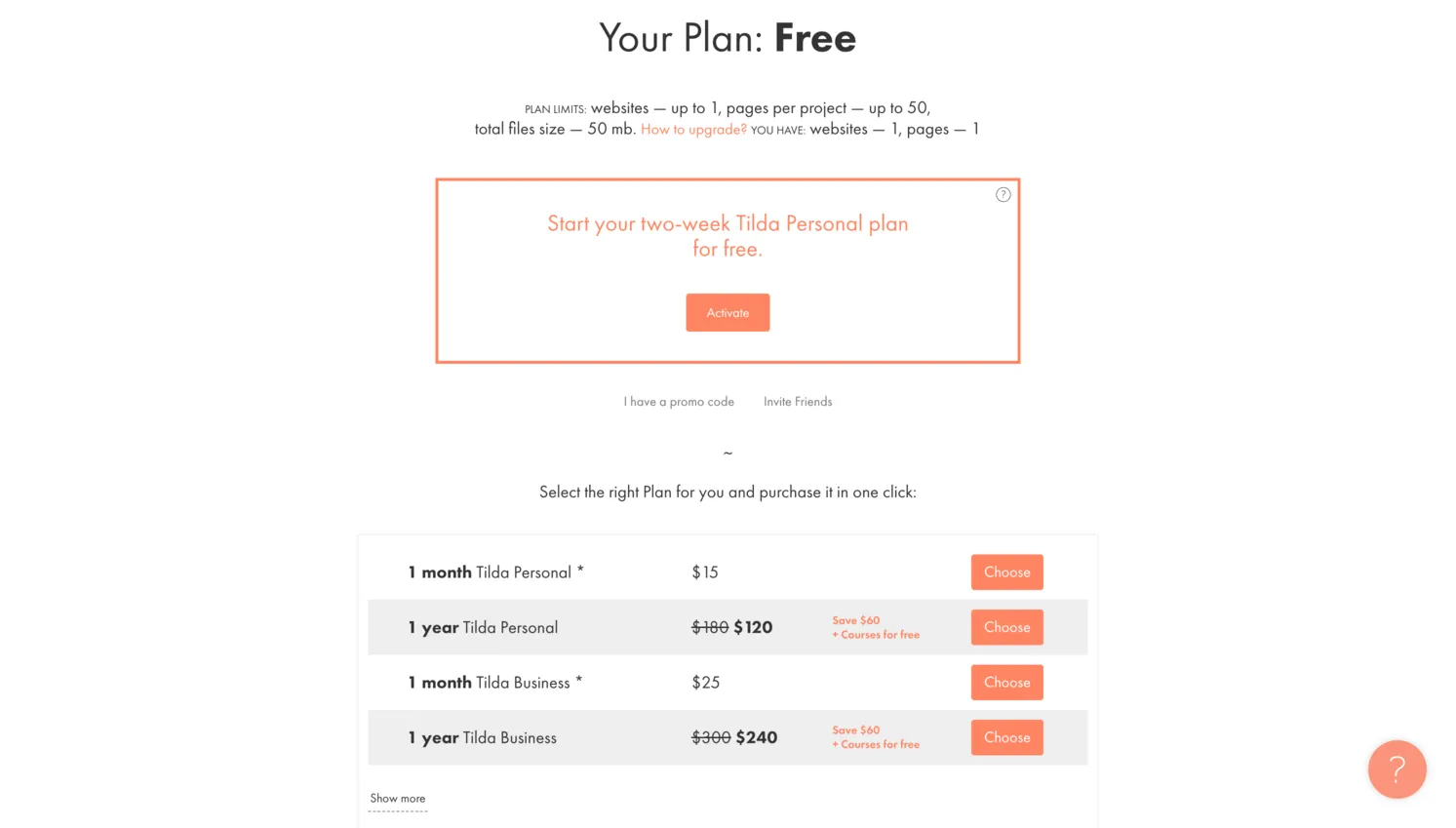
Tilda offers three plans with clear feature distinctions between each tier. All pricing below reflects annual billing rates, with monthly billing available at a higher cost.
| Plan | Price (Annual) | Price (Monthly) | Key Features |
|---|---|---|---|
| Free | $0/mo | $0/mo | 1 site, 50 pages, 100 blocks, Zero Block, 50MB storage, Tilda subdomain |
| Personal | $10/mo | $15/mo | 1 site, 1000 pages, 600+ blocks, custom domain, CRM, forms, store (5K products), SSL, custom fonts, Google Analytics |
| Business | $20/mo | $25/mo | 5 sites, 1000 pages each, 600+ blocks, code export, store (50K products), all Personal features |
Tilda's pricing is competitive, especially at the Personal tier. At $10 per month with annual billing, you get a custom domain, 1,000 pages, the full block library, CRM integration, and ecommerce support, which is comparable to or better than what Wix and Squarespace offer at similar price points. The Business plan at $20 per month adds multi-site support and code export, which is valuable for freelancers and agencies managing multiple client projects. The free plan is actually useful for portfolios and personal projects, though the 50MB storage limit means you will need to be disciplined about file sizes.
Final Verdict
Tilda occupies a niche position in the website builder market. It is not trying to be the most feature-rich platform or the simplest one-click solution. Instead, it focuses heavily on design quality and content presentation. The block-based approach produces websites that look polished and editorially refined, and Zero Block adds a layer of creative freedom that few competitors offer at this price point. However, this design focus comes at the cost of breadth: Tilda lacks features that users of Wix or Squarespace take for granted.
The platform is a reasonable choice for designers, creative agencies, content marketers, and editorial teams who build landing pages, portfolios, or visually rich storytelling websites. It can also work for small businesses that want a professional-looking web presence without hiring a designer, since the block library handles much of the layout work. Trustpilot reviewers (4.5 out of 5 from 88 reviews) generally praise the interface and design quality, though a notable minority report frustrations with support and branding restrictions on monthly plans.
Where Tilda falls short is in areas outside its core focus. Ecommerce is functional but limited, customer support lacks real-time options, and the free plan's storage and domain restrictions mean serious users will need to upgrade. The company's Russian origins and potential data processing on Russian servers are also worth weighing, particularly for business users handling sensitive customer information. Our overall score of 3.5 out of 5 reflects a builder that excels at what it was designed to do (create visually refined, content-driven websites) while acknowledging meaningful gaps in features, support, and transparency around data handling. If design quality is your top priority and you are comfortable with the platform's background, Tilda is worth considering.
Visit TildaFrequently Asked Questions
Is Tilda really free?
Can I use a custom domain on Tilda's free plan?
What is Tilda's Zero Block editor?
Is Tilda good for online stores?
How does Tilda compare to Wix and Squarespace?
Trustpilot Score
Based on 88 reviews on Trustpilot
Tilda holds a strong 4.5 out of 5 on Trustpilot, with 75% of reviews awarding 5 stars. Satisfied users consistently highlight the intuitive block-based interface, the creative power of Zero Block, and the quality of the design output. Several reviewers praise Tilda for delivering professional results without coding knowledge. On the negative side, 14% of reviews are 1-star, with recurring complaints about forced "Made on Tilda" branding even on monthly paid plans, slow or automated customer support responses, and confusing ecommerce setup. A few users also report issues with unauthorized billing. The review count is relatively small (88), but the overall sentiment is positive for design quality and mixed for support and billing transparency.
Read all reviews on TrustpilotOur Hands-On Experience
We built a multi-page portfolio site on Tilda's free plan. After signing up, we started from a blank page to test the block library. Browsing through the available blocks and assembling pages was straightforward. We assembled a four-page portfolio site with a hero section, an about page, a project gallery, and a contact page without difficulty. The output looked good for the effort involved.
The block-based editor requires some adjustment if you are used to freeform builders like Wix. You work within the structure each block provides, customizing colors, text, images, and spacing through a settings panel. This can feel limiting when you want to move elements outside the block's constraints. Zero Block, the freeform editor, gives more creative control with precise positioning and per-breakpoint responsive settings, but it has its own learning curve and took us a while to get comfortable with.
The free plan's 50MB storage cap required aggressive image compression, and we found the quota filled up quickly even with just a few pages of modest imagery. The restriction to 100 blocks from the library meant some categories had limited options, and some blocks we wanted were locked behind paid plans. The Tilda branding and tilda.ws subdomain make the free tier unsuitable for professional or client-facing work. Pages with multiple animation-heavy blocks loaded noticeably slower on mobile.
Tilda produces good-looking pages and the block library is its main strength. The free plan works for testing and personal projects, but feels more like an extended trial than a permanent solution. The learning curve is steeper than simpler builders, and Tilda being a Russian-founded platform with some data processing in Russia is worth considering before committing content and customer data.