
Kleap Review 2026: AI Mobile-First Website Builder
Kleap markets itself as an AI-powered website builder, but our experience was deeply disappointing. The AI generation is extremely slow, producing a generic SaaS landing page after a long wait, and there is no visual editor to refine the result — you either regenerate via prompts or edit raw code. With zero Trustpilot reviews and a confusing pricing structure, Kleap ranks at the bottom of our list.
Overview
Kleap is an AI-powered website builder that sets itself apart from the crowd with two key differentiators: a mobile-first design approach and full-stack development capabilities. While most website builders like Wix and Squarespace design for desktop screens first and then adapt layouts for mobile devices, Kleap flips that convention. Every site built on Kleap starts with the mobile experience as the primary design target, with desktop layouts derived from that foundation. In a world where mobile traffic accounts for more than half of all web visits, this is a philosophically sound approach that results in sites that perform exceptionally well on phones and tablets.
Full-Stack Capabilities
Beyond basic website creation, Kleap positions itself as a full-stack platform. This means it goes further than the typical drag-and-drop builder by offering server-side rendering, built-in forms with backend data management, and the ability to create progressive web apps that behave like native mobile applications. For developers and technically inclined users, this bridges the gap between no-code website builders and custom development. For non-technical users, the AI generation handles most of the complexity. You describe what you want, and the platform assembles a functional site with working forms, data logic, and responsive layouts.
A Younger Platform
Kleap is a relatively young platform compared to veterans like Wix (founded in 2006) or Squarespace (2003), and that newer status comes with both advantages and drawbacks. The technology is modern and the AI capabilities are truly useful, but the integration network is still maturing. The template library is smaller, the community is thinner, and the documentation is less extensive than what you find with established competitors. This review examines every aspect of Kleap to help you decide whether its unique strengths outweigh the growing pains of a younger platform.
Kleap Free Plan
Kleap offers a free trial that lets you test the AI generation before committing to a paid plan. There is no permanent free tier. Given the extremely slow AI generation and lack of a visual editor, the trial will likely be enough to see the platform's significant limitations before spending any money.
Entry-Level Paid Plan
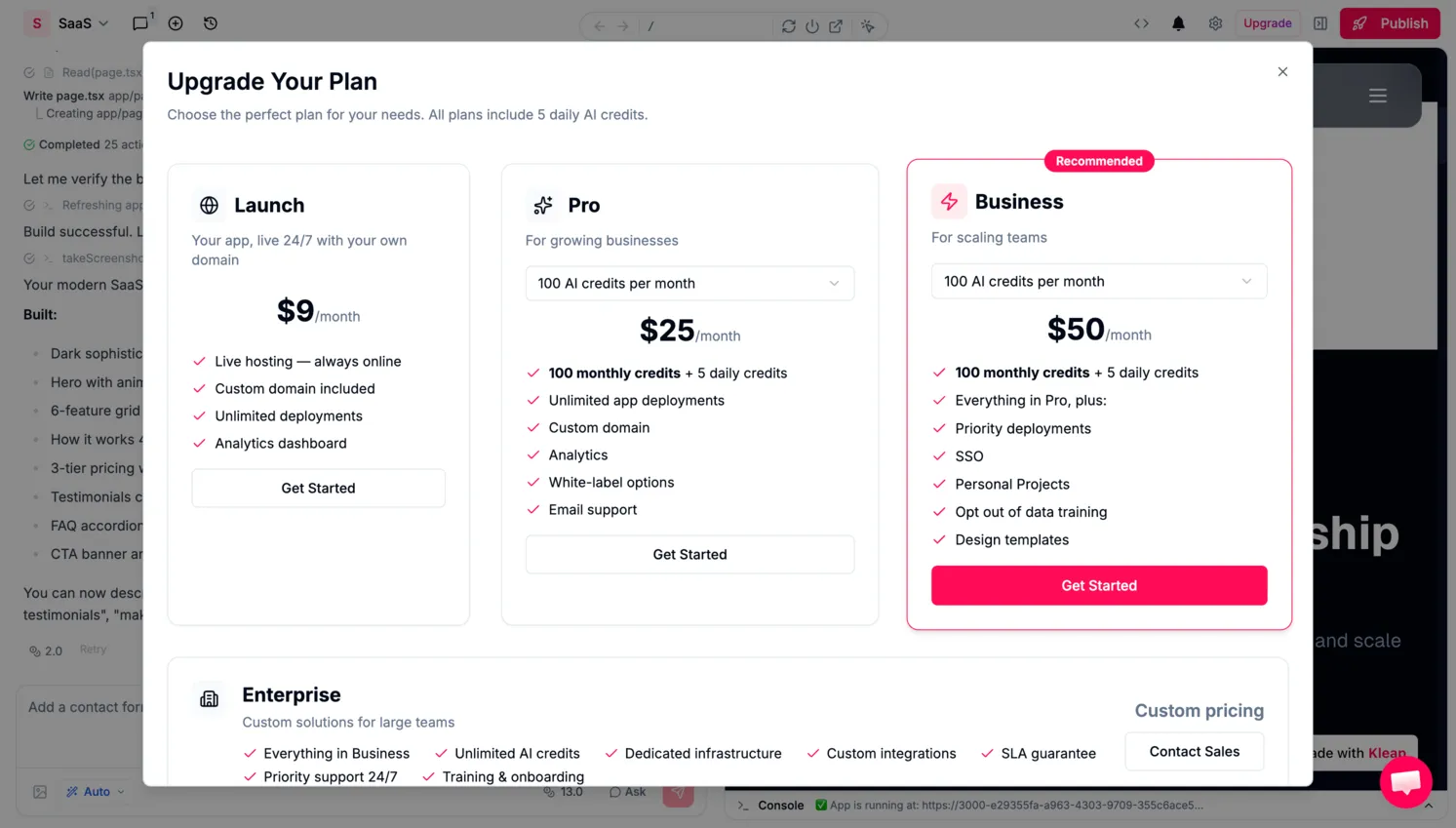
The lowest paid tier is the Launch plan at $9 per month, which includes a custom domain and 100 monthly AI credits. The Pro plan at $25/mo and Business plan at $50/mo offer additional features. All paid plans include the same 100 AI credits per month. Given the slow generation times and lack of a visual editor, even $9/mo feels overpriced compared to what competitors offer.
Is the Free Trial Enough?
The free trial lets you test the AI generation, and given the slow generation times, you will quickly understand the platform's limitations without needing to spend anything. Unlike Wix or WordPress.com, which let you maintain a basic site indefinitely on their free tiers, Kleap requires a paid subscription for any production use.
Ease of Use
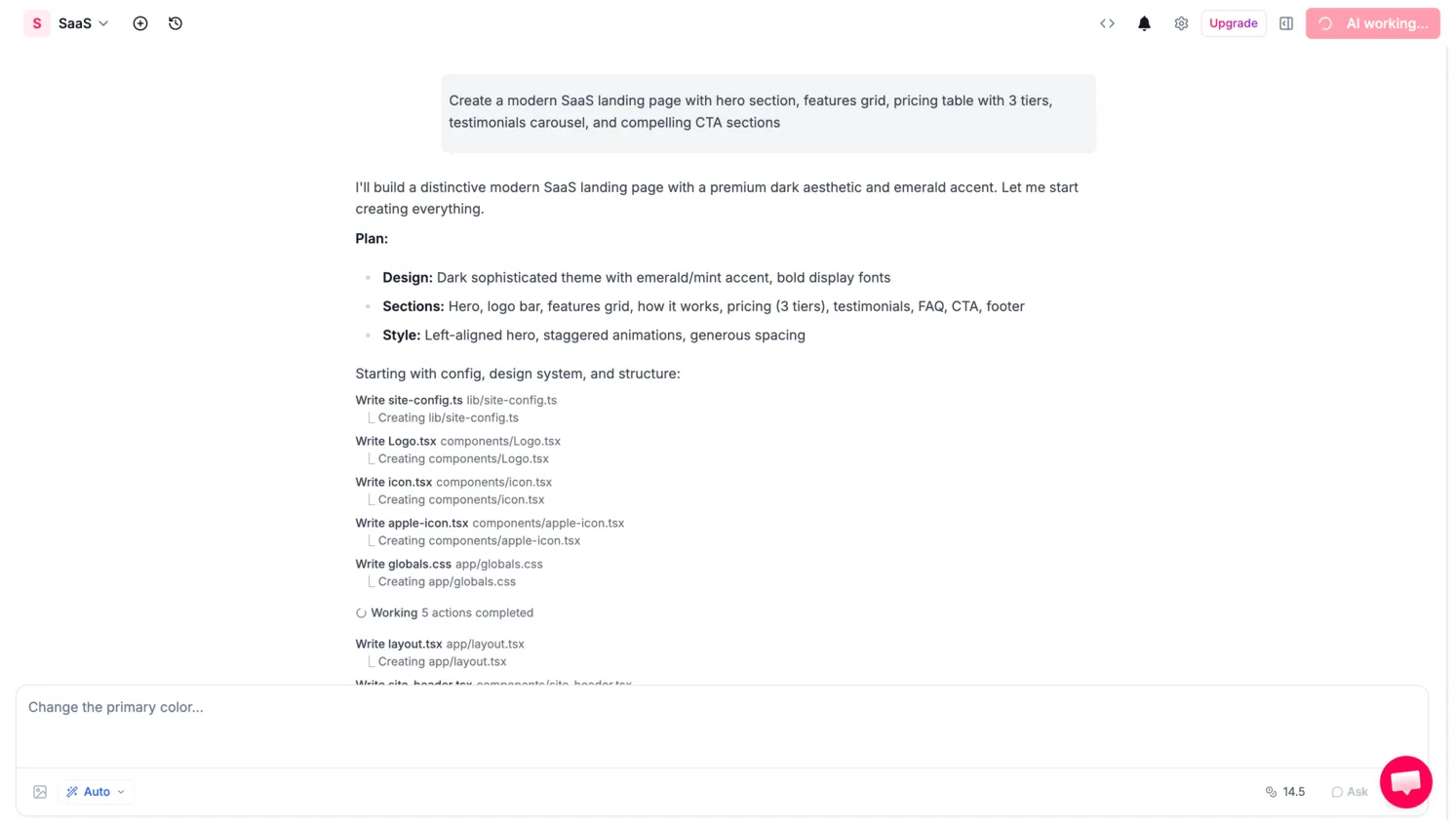
Kleap's onboarding asks a series of questions about your project, then hands everything to an AI that generates your website. The problem is that this generation process is painfully slow. Our test generation took several minutes to produce a generic SaaS landing page — a long wait spent staring at a loading screen. Compare this to competitors like Beste, Durable, or even Wix's AI builder, which generate comparable results much faster.
No Visual Editor
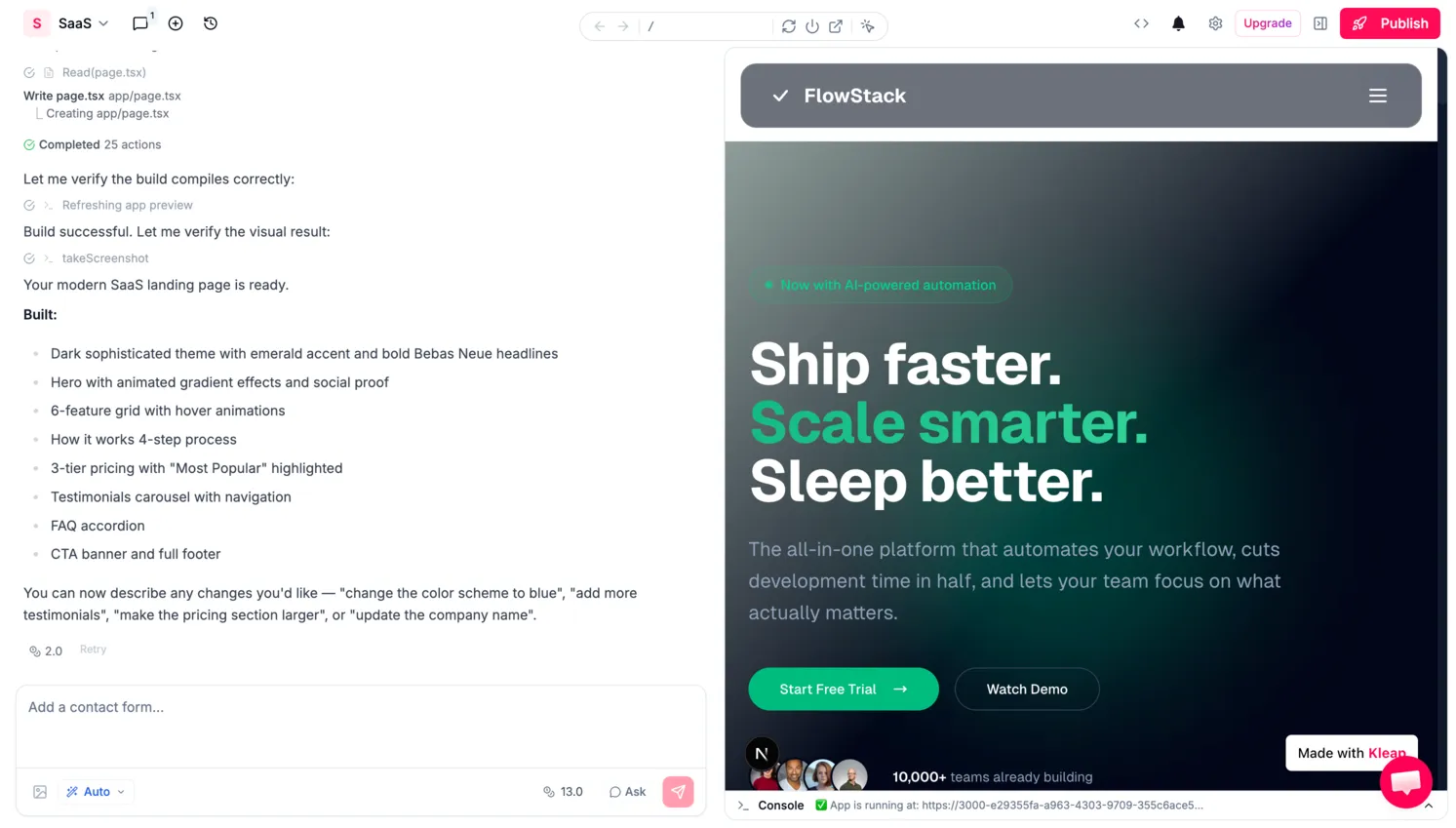
Contrary to what the current review text previously stated, Kleap does not have a traditional block-based visual editor. Once the AI generates your site, you cannot click on elements to edit them visually. Instead, you have two options: write another AI prompt to regenerate or modify sections, or export the code and edit it manually. This makes Kleap fundamentally different from (and far less usable than) visual builders like Wix, Squarespace, or Framer. For anyone who expects a drag-and-drop editing experience, Kleap will be a major letdown.
A Frustrating Experience Overall
The combination of slow generation, no visual editing, and sparse documentation makes Kleap one of the most frustrating builders we have tested. The AI prompts often produce results that need significant refinement, but the only way to refine is to prompt again — each time waiting minutes for the output. Non-technical users will find this workflow bewildering. Even technically proficient users who are comfortable editing code will question why they are using Kleap instead of a proper development framework. The platform's ease of use is, in our experience, the worst of any builder we have reviewed.
Design & Templates
Kleap's design output is modern and visually clean, especially on mobile devices. The mobile-first approach means your site will look excellent on smartphones without any additional tweaking. Text is readable, buttons are properly sized for touch interaction, images scale gracefully, and navigation is optimized for vertical scrolling. Desktop layouts are generated automatically from the mobile foundation and generally look good, though they occasionally feel less refined than what you would get from a desktop-first builder like Squarespace where the larger screen is the primary design canvas.
AI-Generated Design Quality
The AI-generated designs draw from a library of section templates and layout patterns. You can choose from various styles for headers, feature grids, testimonial sections, contact forms, team profiles, and more. Color palettes and typography pairings are handled globally, and the AI does a competent job of maintaining visual consistency across your site. The designs tend toward clean, contemporary aesthetics with generous whitespace and bold typography, a style that works well for tech startups, freelancers, agencies, and modern service businesses.
Customization Limitations
The weak spot is variety. Kleap's template library is smaller than what Wix or Squarespace offer, and the AI-generated designs can start to feel repetitive if you browse multiple sites built on the platform. Manual customization options exist (you can adjust colors, fonts, spacing, and imagery) but the degree of creative control is narrower than what power users expect. Custom HTML and CSS injection requires the Grow plan or higher, and pixel-level layout adjustments are not available. For users who want a great-looking mobile-first site without obsessing over design details, Kleap delivers. For those who want to craft a visually unique brand experience, the constraints will feel limiting.
Features
Kleap's feature set is where the platform diverges most from traditional website builders. The standard building blocks are all present: text sections, image galleries, contact forms, embedded maps, social media links, and video embeds. But Kleap adds a layer of full-stack functionality that most drag-and-drop builders simply do not offer. Built-in forms go beyond simple contact collection. They can connect to backend data management, allowing you to create workflows where form submissions are stored, processed, and acted upon within the platform itself. This bridges the gap between a static website and a lightweight web application.
Server-Side Rendering
Server-side rendering is another highlight capability. While most website builders generate static or client-rendered pages, Kleap's server rendering means your pages can include dynamic content that is generated on each request. This has practical implications for SEO (server-rendered pages are easier for search engines to crawl and index accurately) and for performance, since the initial page load delivers fully formed HTML rather than relying on JavaScript to build the page in the browser. For technically minded users, this is a significant advantage that puts Kleap closer to frameworks like Next.js or Nuxt than to typical no-code builders.
Progressive Web Apps
The platform also supports creating progressive web apps, which means your site can be installed on a user's home screen and behave like a native mobile application with offline support and push notification potential. This is a feature that virtually no other free website builder offers and reflects Kleap's mobile-first philosophy taken to its logical conclusion. That said, the more conventional features (blogging, third-party integrations, and app marketplace) are underdeveloped compared to Wix or WordPress.com. There is no rich app marketplace to extend functionality, and the blogging tools are basic. Kleap is strong at modern web application patterns but lags behind in traditional content management.
SEO Tools
Kleap provides a dependable foundation for search engine optimization, especially thanks to its server-side rendering and mobile-first architecture. Google has used mobile-first indexing as the default for all websites since 2023, which means Kleap's mobile-first approach aligns well with how search engines evaluate and rank pages. Server-rendered pages also give Kleap an advantage over client-rendered builders because search engine crawlers receive fully formed HTML content without needing to execute JavaScript, a factor that can improve indexing speed and accuracy.
Standard SEO Controls
The platform includes standard SEO controls: you can customize page titles, meta descriptions, and URL slugs. All Kleap sites include SSL encryption by default, and the hosting infrastructure delivers fast page load times with a claimed 99.9% uptime. Image alt text is editable, and the AI generation typically produces a reasonable heading hierarchy that helps search engines understand your content structure. These fundamentals are well-handled and put Kleap on par with most competitors for basic SEO needs.
Advanced SEO Gaps
Where Kleap falls short is in advanced SEO tooling. There is no built-in SEO audit tool, no keyword suggestions, and limited control over structured data markup beyond what the platform generates automatically. Sitemap management is handled by the platform rather than offering user-configurable options. Redirect management and canonical URL controls are either absent or limited. For local businesses and simple websites, Kleap's SEO basics will suffice. For content marketers or businesses competing in high-traffic niches, the lack of advanced SEO tools means you may need to supplement with external solutions, or choose a platform like Wix or WordPress.com that offers more wide-ranging SEO features out of the box.
Ecommerce
Ecommerce is Kleap's weakest area. The platform does not offer a dedicated online store module comparable to what Wix, Squarespace, or Shopify provide. You can create product showcase pages and use the built-in forms and data management features to collect orders or payment information, but there is no native shopping cart, checkout flow, inventory management, or order tracking system. Payment processing requires integration with external services rather than being handled natively within the platform.
Workarounds for Selling
For users who need to sell a small number of products or services (a freelancer offering a course, or a consultant selling a single service package) Kleap's form-based approach can work as a workaround. You can build a product page, add a payment form linked to a service like Stripe, and manage orders through Kleap's data management backend. But this is a manual, custom-built solution rather than a well-crafted ecommerce experience. If selling online is a meaningful part of your business, Kleap is not the right platform. Consider Wix for a general-purpose builder with strong ecommerce, or a dedicated platform like Shopify for a full-featured online store.
Pros and Cons
Pros
- Code export lets you take the generated code elsewhere
- SSL and GDPR compliance included on paid plans
- 100 monthly AI credits included with all paid plans
Cons
- Terrible user experience: AI generation is extremely slow, producing mediocre results
- No visual block-based editor — you can only regenerate pages via AI prompts or edit the raw code
- No permanent free plan; only a limited free trial is available
- Zero Trustpilot reviews and minimal third-party validation as of March 2026
- Ecommerce capabilities are minimal and underdeveloped
- Generated output is average at best: generic SaaS landing pages with little customization
- Smaller community and fewer third-party integrations than any established builder
- Pricing is confusing and has changed multiple times
- Relatively new platform with no proven track record
Kleap Pricing
| Plan | Price | Key Features |
|---|---|---|
| Free Trial | $0 | Limited trial to test AI generation, no published site |
| Launch | $9/mo | 100 AI credits/mo, custom domain, basic features |
| Pro | $25/mo | 100 AI credits/mo, advanced features, no branding |
| Business | $50/mo | 100 AI credits/mo, priority support, full feature access |
Kleap's pricing has changed multiple times, which does not inspire confidence. The current structure includes a Launch plan at $9/mo, Pro at $25/mo, and Business at $50/mo. All paid plans include 100 monthly AI credits. Given the quality of the AI output and the lack of a visual editor, it is difficult to justify these prices when competitors like Beste, Carrd, or Wix offer significantly better experiences at similar or lower price points.
Final Verdict
Kleap is the lowest-ranked builder in our entire review. The AI-powered generation concept sounds promising on paper, but the execution is deeply flawed. Our generation was extremely slow, producing a generic, mediocre SaaS landing page after a long wait. There is no visual editor to refine the output — you either prompt the AI again (and wait again) or export the code and edit it manually. This is not a workflow that any non-technical user can reasonably follow, and even developers will find it frustrating compared to modern tools.
The pricing starts at $9 per month for the Launch plan, with Pro at $25/mo and Business at $50/mo. All plans include 100 AI credits. Given the quality of the output and the absence of a visual editing experience, these prices are hard to justify. With zero Trustpilot reviews, a pricing structure that has changed multiple times, and no meaningful community or documentation, Kleap feels more like an early experiment than a production-ready website builder.
We score Kleap a 2.2 out of 5, the lowest score in our review. We cannot recommend this platform for any use case. Whether you need a simple landing page, a business site, or a portfolio, virtually every other builder on our list will serve you better. If you want AI-assisted building, try Durable or Beste. If you want a solid free tier, try Wix or Carrd.
Frequently Asked Questions
Is Kleap really free?
What makes Kleap different from other website builders?
Can I use Kleap for an online store?
How does Kleap compare to Wix or Squarespace?
Is Kleap good for SEO?
Trustpilot Score
0 reviews on Trustpilot
Kleap has no reviews on Trustpilot as of March 2026. The business profile exists but has not received any customer ratings. This is consistent with the platform's relatively young status in the website builder market. We were also unable to find substantial independent reviews of Kleap on major comparison sites like WebsiteBuilderExpert, Tooltester, or SiteBuilderReport. While the platform may perform well, the complete absence of external user feedback is a factor potential users should weigh before committing their website to a platform with minimal public track record.
View Kleap on TrustpilotOur Hands-On Experience
We attempted to build a site on Kleap, and it was one of the most frustrating testing sessions we have conducted. The AI generation process was extremely slow for a single SaaS landing page. The result was a generic, mediocre page that looked like it could have been assembled from any stock template. The text was filler, the layout was predictable, and the overall quality was noticeably below what Durable, Beste, or Wix's AI produces much faster.
There is no visual editor. After the AI generates a page, you cannot click on elements and edit them. Kleap only allows you to write new prompts to regenerate sections or export the code to edit manually. Each regeneration attempt means another multi-minute wait. We went through multiple prompt cycles trying to improve the hero section, each time waiting minutes for changes that would be instant in a visual editor.
The code export feature does work, and the generated code is reasonably clean. If you are a developer who just wants AI to scaffold a starting point that you will then customize in your own code editor, Kleap can serve that narrow purpose. But for that use case, tools like Lovable or even ChatGPT produce better results faster. For non-technical users, Kleap is essentially unusable. We cannot identify any audience for whom Kleap is the best choice.