
Jimdo Review 2026
Jimdo takes an AI-first approach to website building, letting you launch a simple small business site in under five minutes. The free plan is actually usable but comes with significant downsides. Here is our full verdict after practical testing.
Overview
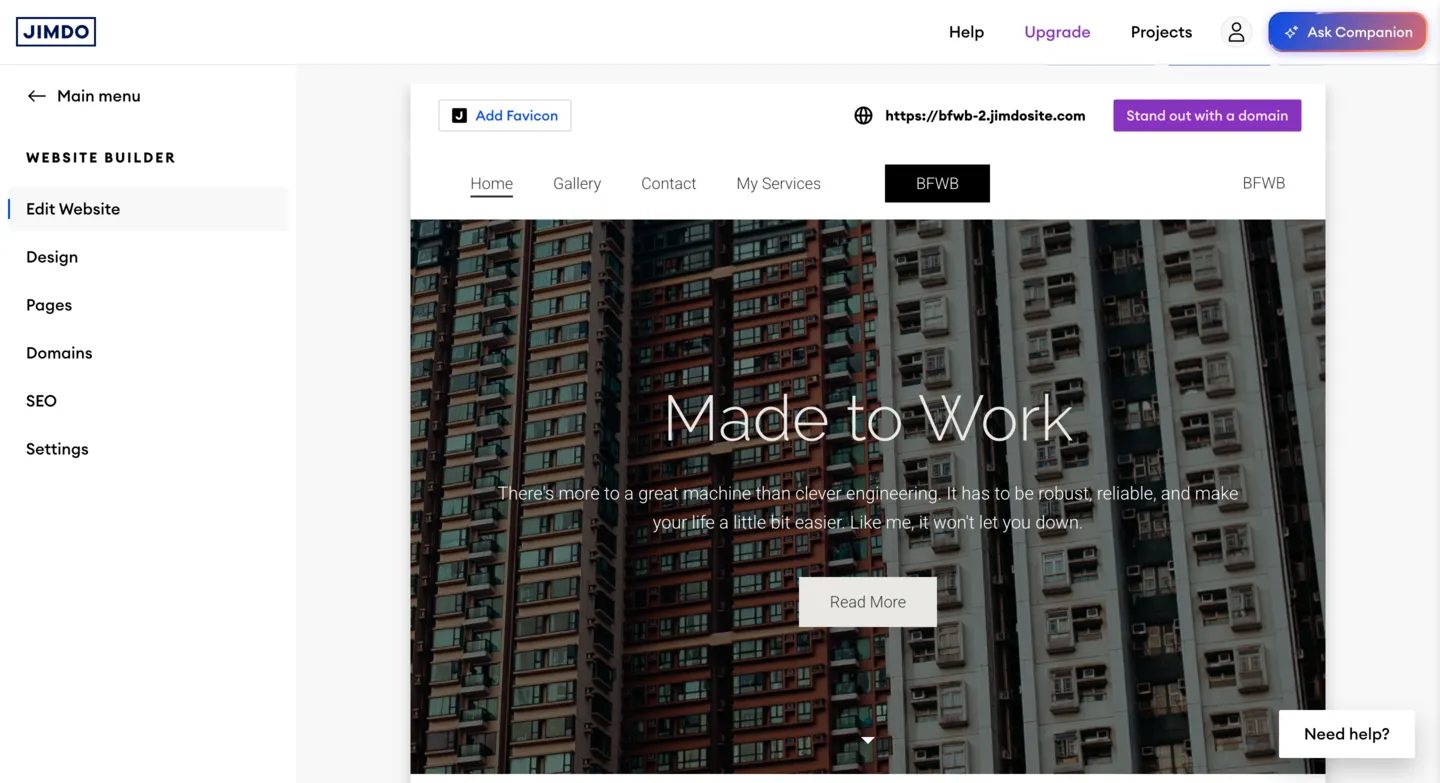
Jimdo is a Hamburg-based website builder that has been around since 2007. Originally a traditional drag-and-drop platform, it pivoted in 2019 to an AI-powered approach with the launch of Jimdo Dolphin. Today, the entire new-user experience revolves around this AI engine: you answer a handful of questions about your business, choose some style preferences, and Jimdo generates a complete website for you within minutes. The company specifically targets freelancers, sole proprietors, and small local businesses that need a professional web presence without the learning curve.
Simplicity as a Trade-Off
This focus on simplicity is both Jimdo's greatest strength and its most significant trade-off. If you want granular design control or an extensive feature set, platforms like Wix or Squarespace are better suited to your needs. But if you are a bakery owner, yoga instructor, or independent consultant who needs a clean, mobile-friendly site live today, Jimdo delivers on that promise with remarkably little friction. The platform supports multiple languages and is especially popular across Europe.
Jimdo offers a free tier alongside several paid plans. The free plan is a reasonable starting point for testing the platform, though its constraints (especially the five-page limit and mandatory Jimdo branding) mean most serious users will eventually need to upgrade. In this review, we break down every aspect of the platform to help you decide whether Jimdo is the right fit for your project.
Jimdo Free Plan
Jimdo's free plan, branded as the Play tier, provides the following:
- 500MB of storage and a Jimdo subdomain (yoursite.jimdofree.com)
- Up to 5 pages with Jimdo branding in the footer
- HTTPS encryption and mobile-responsive design
- Access to the core AI editor
No custom domain connection is available, and there is no option to add a custom favicon. Analytics are limited to basic page-view counts. Despite these restrictions, the site you build will look professional on any device.
The Five-Page Ceiling
The five-page limit is the most restrictive aspect of the free tier. For a simple landing page or a minimal brochure site (a home page, an about page, a services page, a gallery, and a contact page), that can be enough. But if you need a blog, an events section, or multiple service detail pages, you will run into that ceiling quickly. The free plan also lacks ecommerce functionality entirely, so selling products or accepting payments requires upgrading. Still, as a way to evaluate the platform or put up a bare-bones web presence at zero cost, Jimdo Play does the job.
Ease of Use
Ease of use is where Jimdo really stands out. The onboarding process is one of the fastest we have tested across all website builders. When you sign up, Jimdo asks you a short series of questions: what your business does, what kind of site you want, and your style preferences for colors and fonts. Based on your answers, the AI generates a full website with placeholder content that you can start editing immediately. The entire process from account creation to a publishable site takes roughly three to five minutes, faster than virtually every competitor.
Block-Based Editing
The editor uses a block-based approach. You click on any section to edit text, swap images, or rearrange content blocks. There is no complex layer system or pixel-level positioning to worry about. Every element snaps into a logical layout. For users who find tools like Wix overwhelming with too many options, Jimdo's clean interface is a breath of fresh air. Adding new sections is as simple as clicking a plus button and choosing from a curated list of pre-designed content blocks: text, images, galleries, contact forms, and more.
That said, experienced users may feel constrained by the simplicity. You cannot add custom HTML, CSS, or JavaScript on the free plan, and there is no app marketplace to extend functionality. The editor is intentionally opinionated about layout and spacing, which keeps sites looking professional but also limits how much you can deviate from the AI-generated structure. For the target audience of non-technical small business owners, this trade-off is well worth it.
Design & Templates
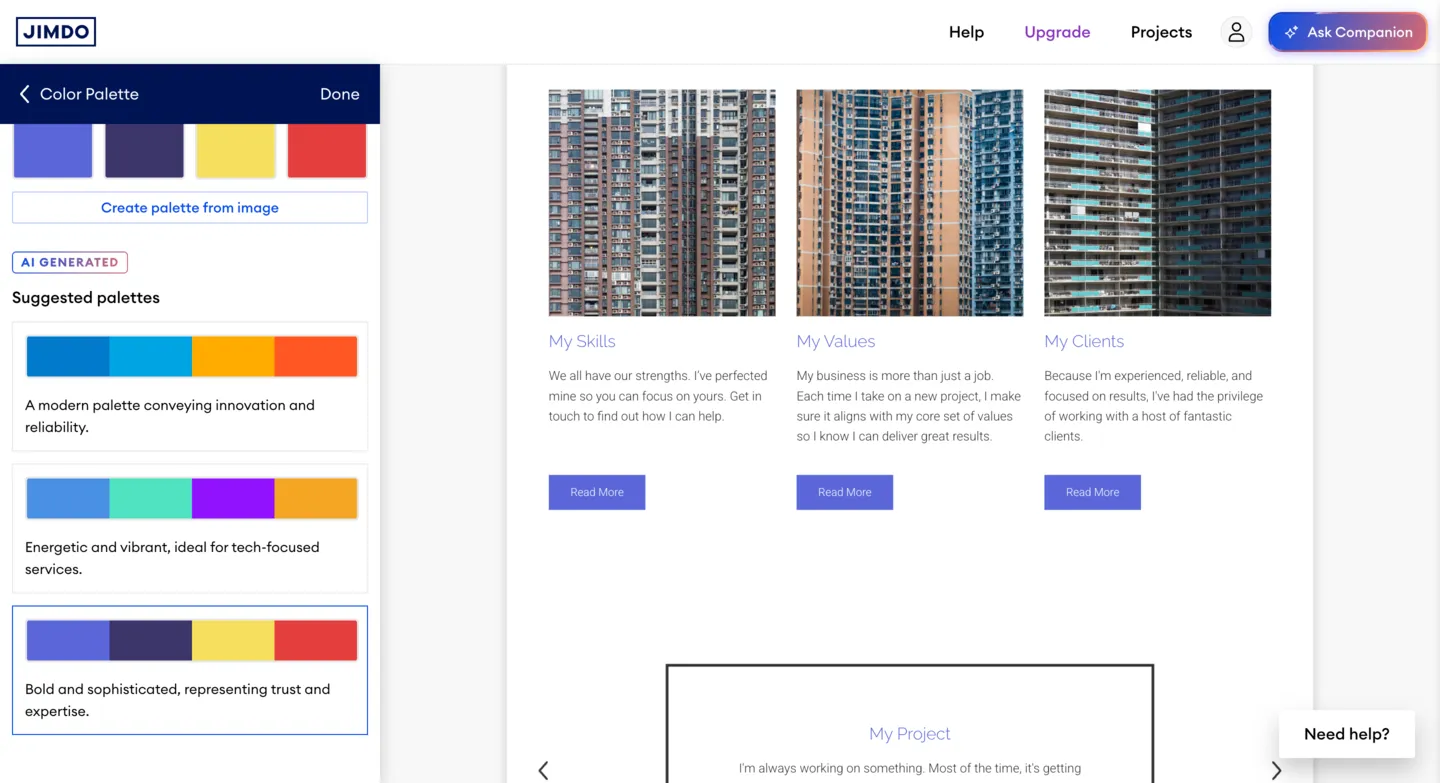
Jimdo takes a fundamentally different approach to design than most website builders. Instead of browsing a template gallery and picking a starting point, the AI generates a unique design based on your business type and style preferences. You choose from a handful of color palettes and font pairings, and the system assembles a layout tailored to your content. The resulting designs are clean, modern, and fully mobile-responsive. They look professional enough for a local business or portfolio, and the typography and spacing are consistently well-handled.
Limited Manual Control
The downside is limited manual control. You cannot freely drag elements around the page, choose from hundreds of templates, or deeply customize your layout the way you can with Wix or Squarespace. Color and font changes apply globally; you cannot style individual sections differently. If the AI-generated design does not match your vision, your options for tweaking it are relatively narrow. Jimdo offers a handful of layout variations for each content block, but the overall structure remains fairly rigid. For users who prioritize creative freedom, this will feel constraining. For those who want a good-looking site without making design decisions, it works well.
Features
Jimdo covers the basics competently but does not go far beyond them. The core feature set includes:
- Text and image blocks, photo galleries, contact forms, and embedded maps
- Social media links and a simple blog module with categories and featured images
- Facebook Pixel and Google Analytics (on paid plans)
- Built-in legal text generator for privacy policies and imprint pages (great for EU businesses)
- GDPR-compliant cookie consent banners out of the box
Blogging Limitations
The blog is functional for occasional posts but lacks scheduling, author profiles, commenting systems, or RSS feeds. For a business that publishes content regularly, WordPress.com or even Wix's blogging tools are significantly more capable.
Integration Gaps
Third-party integrations are limited compared to the competition. There is no equivalent to Wix's App Market or Squarespace's native integrations. If you need booking functionality, membership areas, forums, or complex forms, you will either need to find a workaround via embedded code (available only on paid plans) or choose a different platform altogether. The legal compliance tools, however, are a genuine convenience for small businesses operating in the EU, reflecting Jimdo's European roots and focus on local business needs.
SEO Tools
Jimdo provides a reasonable baseline of SEO tools. You can edit page titles, meta descriptions, and URL slugs for each page. The platform automatically generates a sitemap, uses clean semantic HTML, and ensures all sites are mobile-friendly. Jimdo also includes alt text editing for images and automatic heading hierarchy, both of which help search engines understand your content structure.
The Subdomain Disadvantage
The free plan's SEO capabilities are hampered by the mandatory Jimdo subdomain. Ranking well on Google with a .jimdofree.com address is significantly harder than with a custom domain. On paid plans, Jimdo adds Google Analytics integration and a basic SEO checklist that walks you through optimizing each page. Advanced features like 301 redirects, canonical URLs, or structured data markup are either absent or limited. If SEO is a priority, you will get more mileage from Wix's SEO Wizard, WordPress.com's built-in SEO tools, or a self-hosted WordPress installation with dedicated SEO plugins.
Ecommerce
Ecommerce on Jimdo is available exclusively on paid plans. The free tier does not include any selling features. If you upgrade to the Grow or Unlimited plans, you can create a basic online store with product listings, payment processing via Stripe and PayPal, inventory tracking, and order management. The store functionality covers essentials like product variants, shipping options, and tax settings.
Designed for Small Catalogs
Jimdo's ecommerce is designed for small catalogs. Think a local artisan selling a dozen products, not a full-scale online retailer. There are no features for digital downloads, subscription products, discount codes, or abandoned cart recovery. Product pages are no-fuss but lack the rich customization options found on Shopify, Squarespace, or even Wix's ecommerce features. If selling online is a core part of your business, Jimdo should not be your first choice.
Pros and Cons
Pros
- Extremely fast AI-powered setup: live site in under 5 minutes
- Clean, modern, mobile-responsive designs out of the box
- Very beginner-friendly with no learning curve
- Built-in GDPR compliance tools and legal text generator
- Free plan with 500MB storage and HTTPS included
- Reliable platform for basic small business brochure sites
Cons
- Free plan limited to 5 pages with Jimdo branding
- Very limited design customization and no template gallery
- No ecommerce features on the free plan
- Weak third-party integrations and no app marketplace
- Support can be slow to respond; no live chat or phone support
- Difficult cancellation process and auto-renewal billing complaints
- Blog functionality is basic compared to competitors
- Cannot add custom code on the free plan
- Limited data portability and domain transfer difficulties reported by users
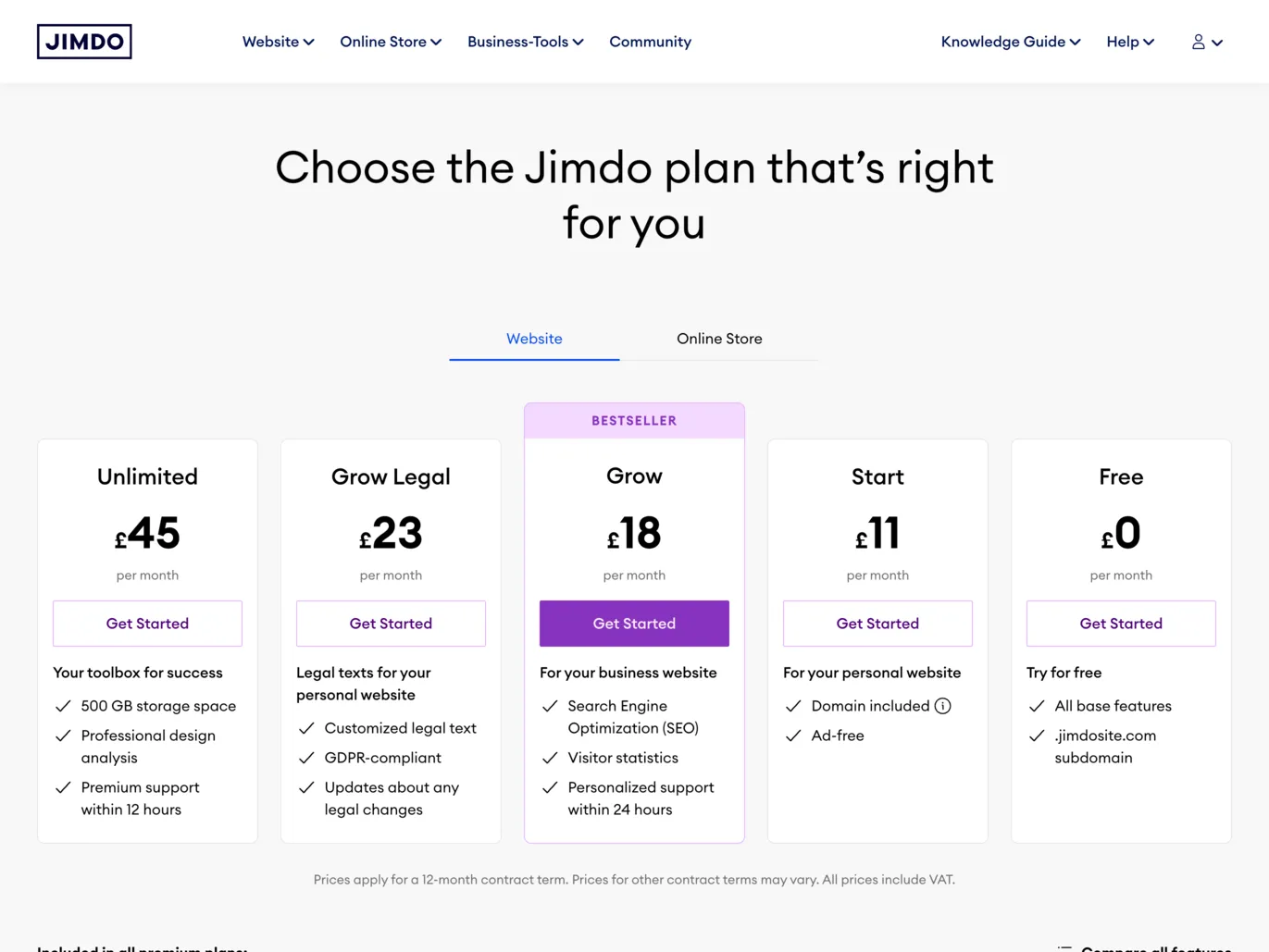
Jimdo Pricing
| Plan | Price | Storage | Key Features |
|---|---|---|---|
| Play (Free) | $0/mo | 500MB | 5 pages, Jimdo subdomain, Jimdo branding |
| Start | $11/mo | 5GB | Custom domain, no Jimdo ads, 10 pages, SEO tools |
| Grow | $17/mo | 15GB | 50 pages, basic ecommerce, Google Analytics |
| Unlimited | $39/mo | Unlimited | Unlimited pages, full ecommerce, priority support |
Prices shown are for annual billing. Monthly billing is available at higher rates. All paid plans include a custom domain for the first year, an SSL certificate, and the removal of Jimdo branding. Note that Jimdo plans auto-renew on a 12-month cycle, so review the cancellation terms before committing.
Final Verdict
Jimdo fills a specific niche well: it is the fastest way for a non-technical small business owner to get a professional-looking website online. The AI-driven setup is genuinely impressive, the resulting designs are clean and mobile-friendly, and the GDPR compliance tools are a real differentiator for European users. If you run a local business and just need a simple web presence with your hours, services, location, and contact information, Jimdo can get you there in minutes rather than hours.
Jimdo falls short, however, in almost every other category. The limited design flexibility, sparse feature set, basic blogging tools, and lack of advanced integrations make it a poor choice for anyone who needs more than a digital business card. The free plan's five-page cap and mandatory branding further limit its usefulness. Trustpilot feedback also reveals recurring concerns about slow customer support, difficult cancellation processes, and auto-renewal billing surprises that prospective users should be aware of. We score Jimdo a 3.4 out of 5: a capable tool for its intended purpose, but not a platform that can grow with more ambitious projects or one that inspires full confidence on the support and billing front. If speed and simplicity are your top priorities, give Jimdo a try. If you want room to expand, consider Wix or WordPress.com instead.
Frequently Asked Questions
Is Jimdo really free?
What is the difference between Jimdo Dolphin and Jimdo Creator?
Can I use Jimdo for an online store?
How does Jimdo compare to Wix?
Is Jimdo good for SEO?
Trustpilot Score
Based on 7,173 reviews on Trustpilot
Jimdo holds a 3.2 out of 5 on Trustpilot based on over 7,000 reviews, with a polarized distribution: 64% of reviewers give 5 stars while 22% give just 1 star. Positive reviews consistently praise the ease of use, beginner-friendly interface, and the ability to create professional-looking websites without technical knowledge. Negative reviews, however, paint a different picture. Users frequently report slow or unresponsive customer support, difficult cancellation processes with inflexible annual billing cycles, unexpected auto-renewal charges, and problems transferring domains away from Jimdo. Several reviewers also cite limited customization options and the absence of features like multilingual support and a plugin system. The split suggests that Jimdo works well for users who stick with simple sites on the free plan, but those who commit to paid plans may encounter frustrating billing and support experiences.
Read all reviews on TrustpilotOur Hands-On Experience
We tested Jimdo by building a small business website for a fictional local bakery on the free Play plan. The AI onboarding was as fast as advertised: after answering a few questions about the business type, preferred style, and color palette, Jimdo generated a complete five-page site with placeholder text, stock images, and a contact form within minutes. The generated layout was clean, the typography was well-chosen, and the mobile version looked polished without any manual adjustments. For sheer speed to a publishable result, Jimdo is among the fastest builders available.
The editing experience was smooth but limited. Replacing all placeholder content with our own copy and images was straightforward. The block-based editor made it easy to swap sections, change headings, and update the contact form fields. However, we quickly ran into walls when trying to customize further. We wanted to add a sixth page for a catering menu, but the free plan's five-page ceiling stopped us. We also attempted to change the spacing between sections and adjust the header layout, but neither option was available. The global color and font controls worked well enough, but there was no way to style individual blocks differently, which made the site feel uniform across every page.
We tested the SEO tools by editing page titles, meta descriptions, and URL slugs, all of which worked as expected. The automatic sitemap generation was a nice touch. However, the .jimdofree.com subdomain on the free plan is a serious limitation for anyone who wants to rank in search results. We also tested image uploads and found that the 500MB storage allowance goes further than expected when images are compressed before uploading. The Jimdo branding in the footer was unobtrusive but clearly visible, and there was no way to hide or minimize it without upgrading. The editor does show upgrade prompts during editing sessions, which was noticeable but less aggressive than some competitors.
Our overall impression is that Jimdo delivers exactly what it promises for its target audience: a fast, no-fuss way to get a basic business website online. The free plan is genuinely usable for a simple brochure site, and the AI-generated designs are more polished than what most beginners would create manually. Where Jimdo falls short is in everything beyond the basics. The lack of custom code access, limited integrations, bare-bones blog, and restrictive page limits mean you will outgrow the platform quickly if your needs expand. Combined with the Trustpilot feedback about billing and support difficulties on paid plans, we would recommend Jimdo primarily as a free-tier option for simple sites, while suggesting users carefully evaluate the terms before upgrading to a paid subscription.