
Hostinger Website Builder Review 2026
Hostinger does not offer any free plan. The website builder requires a paid hosting subscription, and there is no way to access or test it without paying. We were unable to evaluate the website builder itself because of this. We did test Hostinger Horizons, their AI app builder, which has a free tier. With a 4.7 Trustpilot score from over 64,000 reviews, customer sentiment for Hostinger overall is positive, though reviews cover hosting services broadly, not just the website builder.
Overview
Hostinger Website Builder, formerly known as Zyro, is a drag-and-drop website creation platform bundled with every Hostinger hosting plan. Since acquiring Zyro and rebranding it in 2022, Hostinger has invested heavily in integrating artificial intelligence throughout the builder. The result is a tool that can generate page layouts, write marketing copy, create logos, and produce images, all from simple text prompts. For users who want to get a professional-looking site online quickly without sweating over every design decision, it is a reasonable option worth considering.
What sets Hostinger apart from many competitors is its pricing model. Rather than offering a limited free tier with aggressive upsells, Hostinger bundles its website builder with web hosting, a free domain for the first year, and a free SSL certificate. All of this starts at just a few dollars per month. This all-in-one approach means you avoid the piecemeal costs that can add up quickly with other platforms.
The builder itself runs on a modern grid-based editor that lets you drag elements into place, customize fonts and colors, and preview your site across device sizes. It is not as feature-dense as Wix or as design-forward as Squarespace, but it strikes an effective balance between simplicity and capability, especially for small business owners, freelancers, and anyone who values speed over pixel-perfect control.
Free Trial & Pricing
Hostinger does not have a forever-free plan, which is worth noting on a site dedicated to free website builders. However, every plan comes with a 30-day money-back guarantee, so you can test the entire platform (builder, hosting, AI tools, and all) without financial risk. If it does not meet your expectations, you can get a full refund within that window. This is more generous than some competitors that lock key features behind premium tiers even during trials.
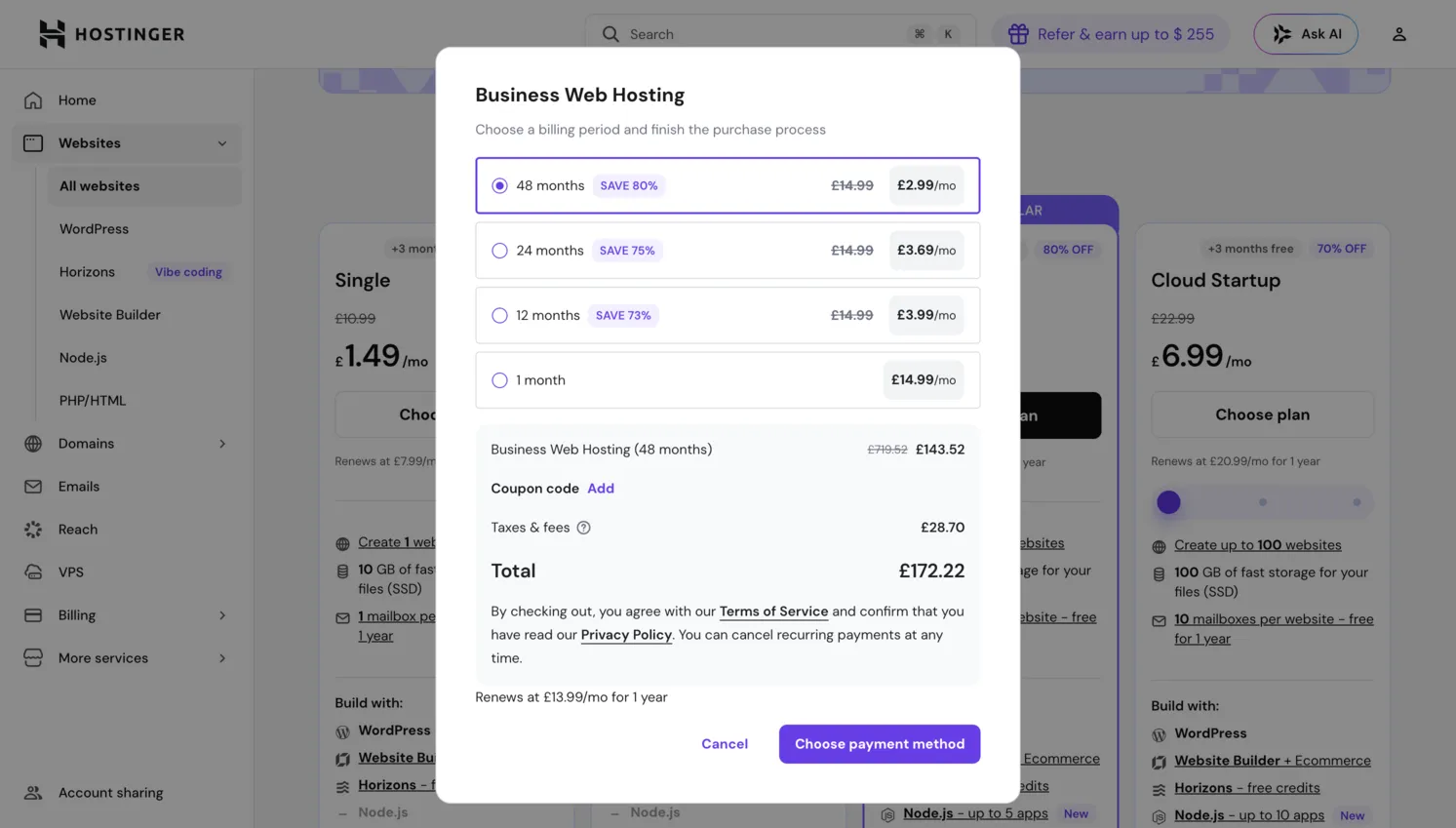
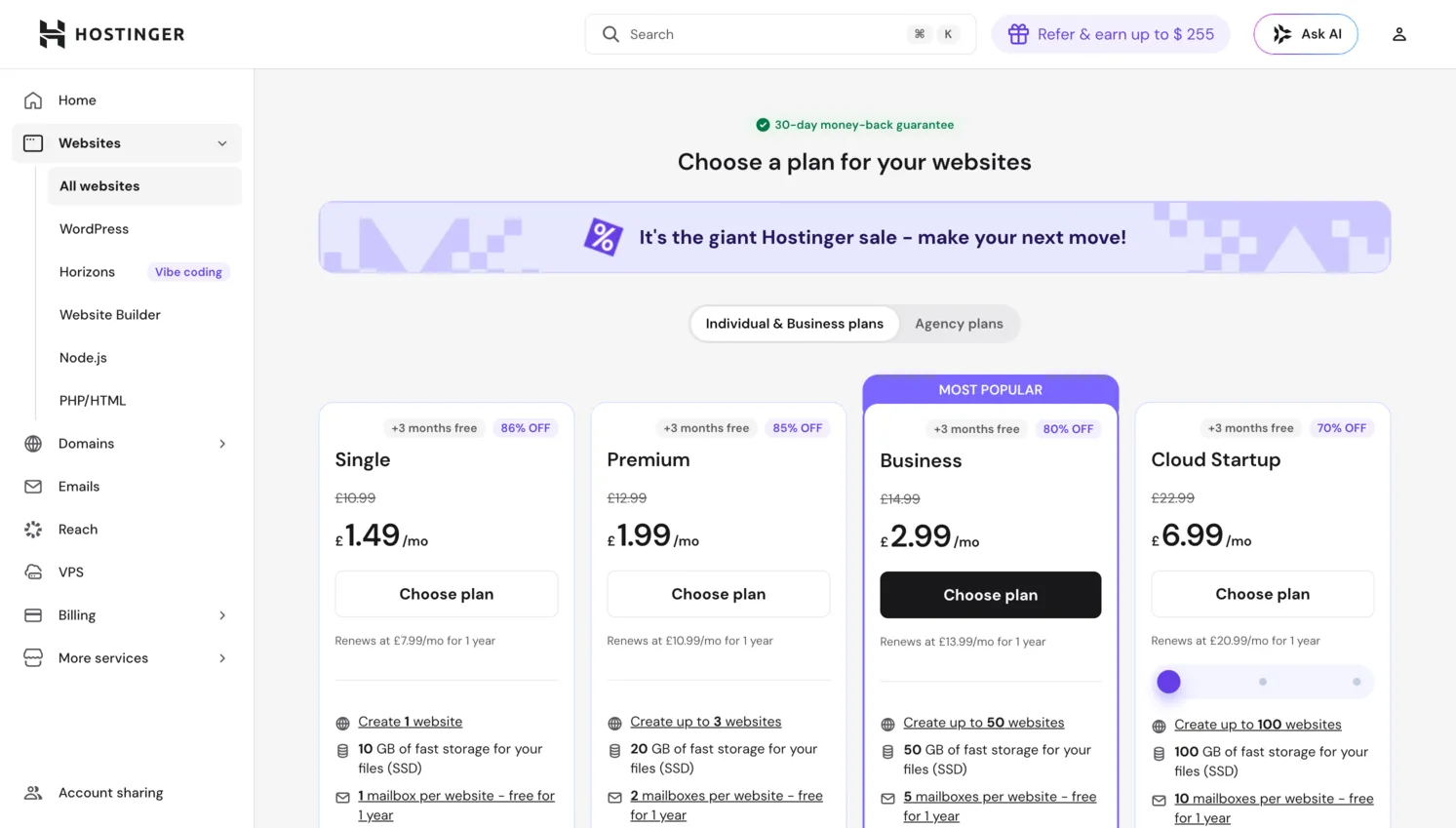
In terms of raw cost, Hostinger is one of the more affordable options available. The Premium plan starts at around $1.99 per month and the Business plan at $2.99 per month when you commit to a 48-month billing cycle. Both include hosting, the website builder, a free domain for the first year, and free email. When compared to standalone builders like Wix (which starts at roughly $17/month for comparable features) or Squarespace ($16/month), the introductory pricing undercuts most competitors. The tradeoff is that you need to commit to a multi-year subscription to lock in those rates. Monthly billing is substantially more expensive, and renewal prices increase significantly (Premium renews at around $10.99/month, Business at $16.99/month), which is an important factor to budget for.
Ease of Use
We could not test Hostinger's website builder because it requires a paid subscription. The ease of use score reflects publicly available information and Trustpilot feedback, not our direct testing. Based on what we can observe from documentation and user reviews, the builder uses a grid-based drag-and-drop editor with AI-assisted site generation.
Hostinger Horizons (Tested)
We tested Hostinger Horizons, the AI app builder that has a free tier. The onboarding asks you to describe your project, and the AI generates an application. Unlike Lovable, Horizons includes an inline visual editor where you can click on elements and modify them directly. This makes basic adjustments easier than prompt-only tools. The editor is functional for small changes like text edits, color tweaks, and layout rearrangements.
That said, the same fundamental issue applies: maintaining and evolving a Horizons-generated app requires either continued AI prompting (which consumes tokens and can break things) or manual code editing. For quick prototypes and demos, it works. For ongoing maintenance, non-technical users will struggle. The inline editing is a real advantage over Lovable, but it does not solve the underlying maintenance problem that all AI builders share.
Design & Templates
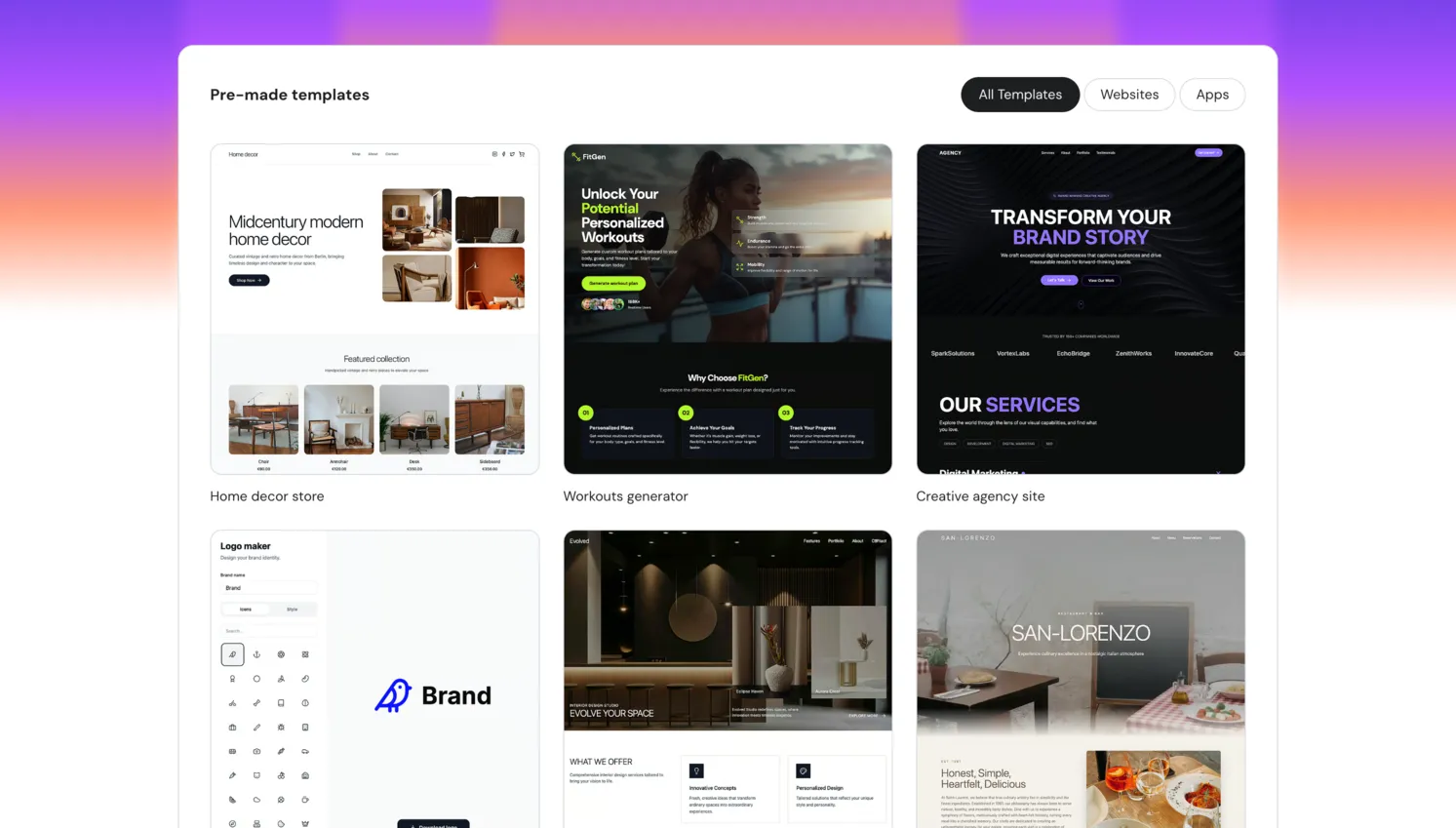
Hostinger offers around 150 professionally designed templates spanning categories like business, portfolio, ecommerce, restaurants, events, and personal blogs. While the template count is smaller than Wix's library of 800+, the quality is consistently high. Templates are clean, modern, and mobile-responsive out of the box. Hostinger takes a mobile-first design approach, meaning that templates are optimized for smaller screens from the start rather than being desktop designs that adapt downward.
Customization within templates is easy but not limitless. You can modify colors, fonts, section ordering, and images, and you can add or remove content blocks like galleries, testimonials, pricing tables, and contact forms. However, you cannot make the kind of granular, pixel-level adjustments that platforms like Wix and Webflow allow. For most users, the available options are more than sufficient. For designers who want complete creative freedom, this might feel restrictive.
AI Logo Maker and Image Generation
The AI logo maker is a welcome addition. It generates logo concepts based on your business name and industry, which you can then customize with different fonts, icons, and color schemes. The results are not going to replace a professional brand designer, but they are perfectly serviceable for a small business or personal project that needs a logo quickly without hiring a freelancer. You can also use AI-generated images throughout your site, which is helpful when you do not have professional photography on hand.
Features
The feature set in Hostinger Website Builder is centered around AI-powered productivity tools:
- AI Writer generates paragraphs of content for any section, from product descriptions to FAQ answers
- AI Image Generator creates custom visuals you can drop directly into your pages
- AI Heatmap predicts where visitors will focus their attention, useful for optimizing calls to action
Blogging and Content
Beyond AI, the builder includes a built-in blogging system with a basic post editor, categories, and scheduling. It is adequate for publishing regular content but lacks some of the depth you would find in WordPress, such as revision history, custom post types, or a robust plugin library. For simple business blogs or personal journals, it works well. Content-heavy sites that depend on advanced editorial workflows may find it limiting.
Marketing Integrations
Marketing integrations are dependable. You can connect Google Analytics, Facebook Pixel, Google Tag Manager, and Hotjar without needing to touch code. There is also built-in support for social media links, WhatsApp chat buttons, and email marketing integrations through platforms like Mailchimp. While the integration list is shorter than what Wix or Squarespace offer, it covers the essentials that most small businesses need to track visitors, run ads, and capture leads.
SEO Tools
Hostinger provides the fundamental SEO tools you need to get your site indexed and ranking. Every page allows you to set custom meta titles, meta descriptions, URL slugs, and alt text for images. The builder automatically generates a sitemap and submits it to search engines. All sites come with an SSL certificate, a confirmed ranking factor. Page load speed is generally good thanks to Hostinger's optimized hosting infrastructure, which contributes positively to Core Web Vitals scores.
Where Hostinger falls slightly behind competitors like Wix and Squarespace is in advanced SEO capabilities. There is no built-in SEO audit tool, no step-by-step SEO checklist, and limited support for structured data markup beyond what the platform generates automatically. For sites competing in moderately competitive search niches, the basics are covered. If SEO is a primary growth channel for your business, however, you may want a platform that offers more granular control or better integrates with dedicated SEO tools. You can still connect Google Search Console and Google Analytics to monitor your performance and identify opportunities.
Ecommerce
Hostinger's ecommerce capabilities are capable enough for small to mid-sized online stores. Here is what you get:
- Up to 500 products, including both physical and digital goods
- Inventory management with stock tracking and product variants (size, color)
- 0% transaction fees on all plans (you only pay payment gateway processing fees)
- Order processing, refunds, and sales analytics dashboard
The zero transaction fee policy is a notable cost advantage over platforms like Squarespace, which charges 3% on its lowest-tier plan. Payment gateway support includes Stripe, PayPal, and a handful of regional payment methods depending on your location. You can also offer discount codes, set up shipping zones with custom rates, and manage tax settings. The checkout process is clean and mobile-optimized. For small businesses selling a manageable number of products, this is more than adequate. Stores with very large catalogs, complex inventory needs, or requirements for subscription billing or multi-currency support may outgrow the platform and need a dedicated ecommerce solution like Shopify.
Pros and Cons
Pros
- Affordable pricing with hosting included in every plan
- AI-powered tools for content writing, image generation, and site creation
- 0% transaction fees on all ecommerce plans
- Trustpilot reviewers praise responsive support (4.7/5 from 64,000+ reviews)
- Hostinger Horizons (AI app builder) has a free tier with inline editing
Cons
- No free plan at all — the website builder requires a paid hosting subscription to even access
- We could not test the website builder because there is no free option
- Fewer third-party app integrations compared to Wix or Squarespace
- Cannot switch templates after publishing without rebuilding
- Renewal prices are significantly higher than introductory rates (e.g., Premium jumps from $1.99/mo to $10.99/mo)
- Hostinger Horizons shares the same maintenance issues as other AI builders — good for prototypes, not production
Pricing
Hostinger bundles its website builder with hosting, so every plan includes both the builder tool and the server space to host your site. Pricing is structured around the length of your subscription, with longer commitments yielding significantly lower monthly rates. Here is a breakdown of the main plans relevant to website builder users:
| Plan | Starting Price | Key Features |
|---|---|---|
| Premium | $1.99/mo (renews at $10.99/mo) | Website builder, 100 websites, free domain (1 year), free SSL, 100 GB SSD storage, free email |
| Business | $2.99/mo (renews at $16.99/mo) | All Premium features plus 200 GB SSD storage, daily backups, CDN, ecommerce features with 0% transaction fees |
All introductory prices listed above reflect the 48-month billing cycle. Monthly billing is available but costs substantially more. Renewal rates are also considerably higher than the introductory prices, so factor those into your long-term budgeting. That said, even at renewal rates, Hostinger's pricing remains competitive with most website builders offering comparable features.
Verdict
Hostinger's website builder scores a 3.3 out of 5 in our review. We could not test the website builder directly because there is no free plan — you need a paid hosting subscription to access it. This is the biggest drawback for a site focused on free builders. If you are willing to pay, the bundled hosting, free domain, SSL, and 0% ecommerce transaction fees represent reasonable value at the introductory price of $1.99 per month.
We did test Hostinger Horizons, their AI app builder, which has a free tier. It is a competent AI builder with inline editing, which puts it a step ahead of Lovable in terms of usability. But the same limitations that apply to other AI builders apply here: maintaining generated apps is difficult, changes can break existing functionality, and it is better suited for prototyping than production use. For prototyping, Lovable's GitHub sync and Supabase integration still make it a more practical choice.
Renewal pricing is a real concern — the jump from $1.99/month to $10.99/month catches users off guard. If you need a free builder, Hostinger is not an option. If you are willing to pay and want a straightforward builder with good ecommerce, it is worth considering.
Try Hostinger Website BuilderFrequently Asked Questions
Does Hostinger Website Builder have a free plan?
Is Hostinger Website Builder good for beginners?
Can I build an online store with Hostinger?
How does Hostinger compare to Wix?
Can I use my own domain with Hostinger Website Builder?
Trustpilot Score
Based on 64,611 reviews on Trustpilot
Hostinger holds a strong 4.7 out of 5 on Trustpilot, with 88% of reviewers awarding 5 stars. Positive feedback centers on responsive and knowledgeable customer support, the ease of use of the platform and control panel, and helpful AI-powered assistance for building sites. On the negative side, 6% of reviews are 1-star, with recurring complaints about website and server downtime, slow resolution of complex technical issues, and difficulties with account suspensions. Billing transparency around renewal pricing is another common concern.
Read all reviews on TrustpilotOur Hands-On Experience
We could not test Hostinger's website builder because there is no free plan or free trial for it. The builder is bundled with paid hosting subscriptions, and without purchasing a plan, there is no way to access the editor, templates, or any features. We do not review products we cannot test, so our assessment of the website builder itself is limited to what is publicly documented and what Trustpilot reviewers report.
We did test Hostinger Horizons, the AI app builder that has a free tier. It works like other AI builders: you describe what you want and the AI generates it. Horizons has inline editing, which is a step up from Lovable where you can only work through prompts or code. The generated output was a standard SaaS-style application. The inline editor made small adjustments easier than pure prompt-based tools.
The same maintenance issues we see across AI builders apply here. Changes to one part of the app can break another. Iterating on complex applications consumes tokens quickly. Non-technical users will struggle to maintain anything beyond a simple prototype. For prototyping, Lovable remains more practical because of its GitHub sync and Supabase integration. Horizons is a reasonable alternative if you prefer inline editing, but neither tool is suited for production use.