
Beste Review 2026: The Composition-First Website Builder
Beste is a relatively new website builder that takes a different approach: instead of drag-and-drop, you compose sites from over 300 pre-designed sections. The free plan is genuinely generous (unlimited pages, custom domain), but the platform has zero external reviews on Trustpilot or any major review site, making it hard to assess long-term reliability. We tested the platform to see whether the composition-first model works in practice.
Overview
Beste (beste.co) launched in January 2026 as a website builder that rejects the drag-and-drop paradigm that has dominated the industry for over a decade. Instead of placing individual elements on a freeform canvas, you build your site by selecting from a library of more than 300 professionally designed sections: hero banners, feature grids, pricing tables, testimonial carousels, FAQ accordions, blog layouts, footers, and everything in between. Each section is already fully designed, responsive, and optimized. You simply choose the blocks you need, arrange them in order, customize the content, and publish.
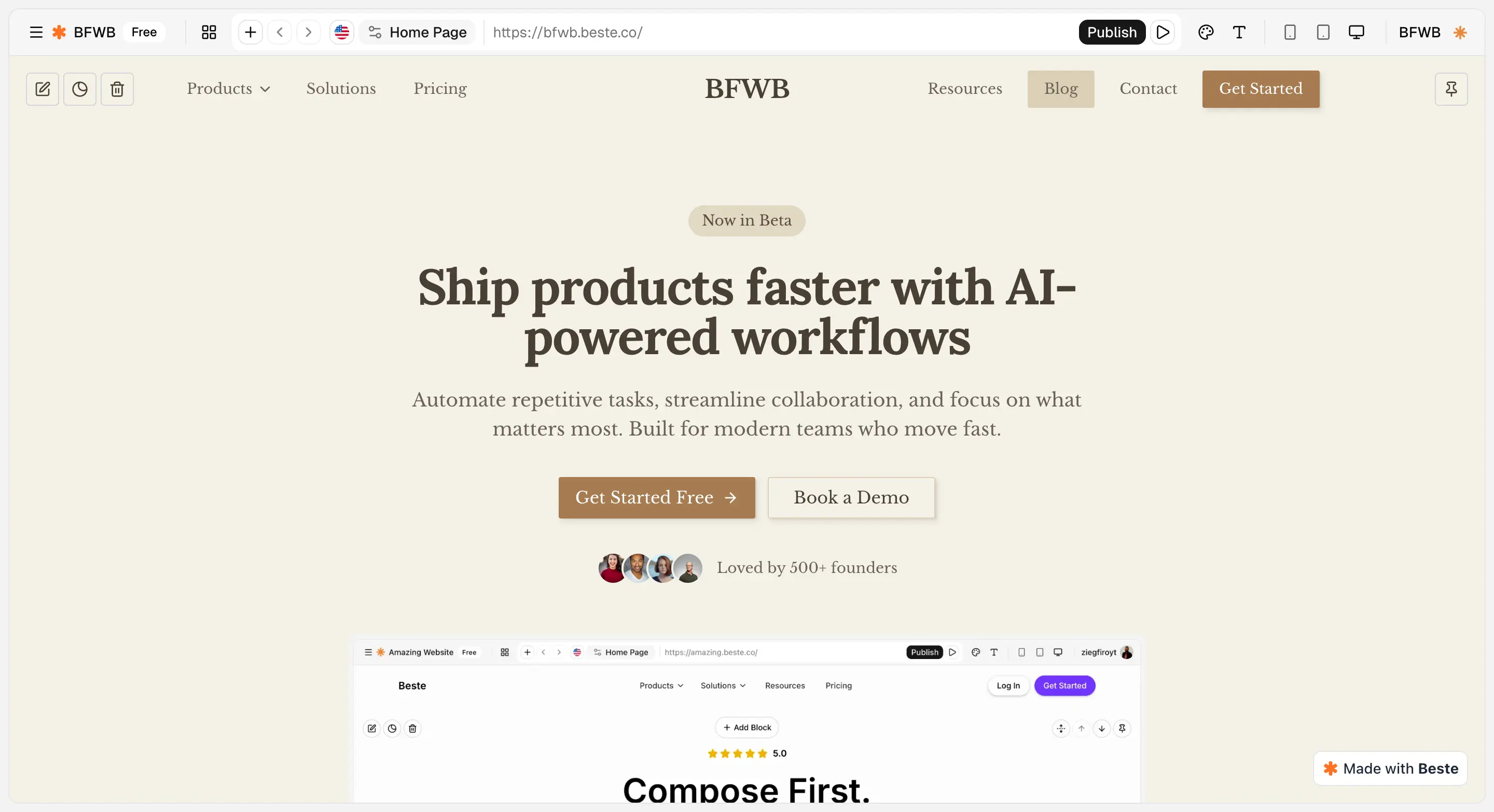
Beste calls this a composition-first approach, and it represents a deliberate philosophical choice: trade total design freedom for speed, consistency, and professional results every time. The platform targets startups, freelancers, small businesses, and agencies who need a professional web presence without the overhead of learning complex design tools. Beste positions itself as a simpler alternative to Webflow and Framer, platforms that offer extraordinary design control but demand significant time investment to master.
Where Webflow might take a designer days to produce a pixel-perfect site, Beste's composition model is designed to get you from account creation to a live, published website in a fraction of the time. Instead of making thousands of micro-decisions about spacing, alignment, font sizes, and responsive breakpoints, you let Beste's curated sections handle the design while you focus entirely on your content and messaging.
Beste is hosted entirely on Vercel's edge network, which means every site benefits from a global CDN, automatic SSL certificates, and the same infrastructure that powers production applications at major technology companies. The free plan is unusually generous (unlimited pages, custom domain support, all core features, and no credit card required) which makes Beste worth serious consideration even if you have not heard of it before. This review covers every aspect of the platform so you can decide whether the composition-first approach fits your needs.
Free Plan Details
Beste's free plan is genuinely generous compared to most competitors. It includes unlimited pages, which immediately sets it apart from competitors like Strikingly and SITE123 that restrict page counts on free tiers. You can connect a custom domain at no cost, a feature that platforms such as Wix and WordPress.com reserve for paid plans. Here is what the free tier includes:
- Full library of 300+ sections and the built-in blog
- Dynamic forms for contact and data collection
- Multi-language support across 32 languages
- No credit card required, and the plan never expires
The free plan does include Beste branding on your site. Cookie consent management, analytics integrations (Google Analytics, Meta Business Suite, PostHog), form email notifications, AI translation, and 301 redirects are all reserved for the Plus plan. While the core building experience is identical between tiers, these missing features matter for professional use. The free plan is functional but has more limitations than the marketing suggests.
For startups validating an idea or freelancers building a portfolio, the free plan removes several common barriers. However, the platform's newness means you are trusting your web presence to a company with no established track record. There are no external reviews, no large user community, and if Beste shuts down, your site cannot be exported or migrated, as the platform does not support code export or self-hosting.
Ease of Use
The composition-first model is not just a marketing label. It fundamentally changes how easy it is to build a website. Traditional drag-and-drop editors like Wix or Squarespace give you enormous freedom, but that freedom comes with complexity. You have to make decisions about element sizing, spacing, alignment, column structures, and mobile responsiveness for every piece of content you add. Beginners regularly produce sites with misaligned text, inconsistent spacing, and layouts that break on smaller screens. Beste eliminates these problems by design: when you add a section, it arrives fully laid out, properly spaced, and responsive across all screen sizes.
The Editing Workflow
After signing up, you choose from available starting points or begin with a blank page. You then browse the section library, which is organized by category:
- Heroes and features for landing pages and product highlights
- Pricing, testimonials, and team members
- FAQ blocks, call-to-action strips, blog layouts, and footers
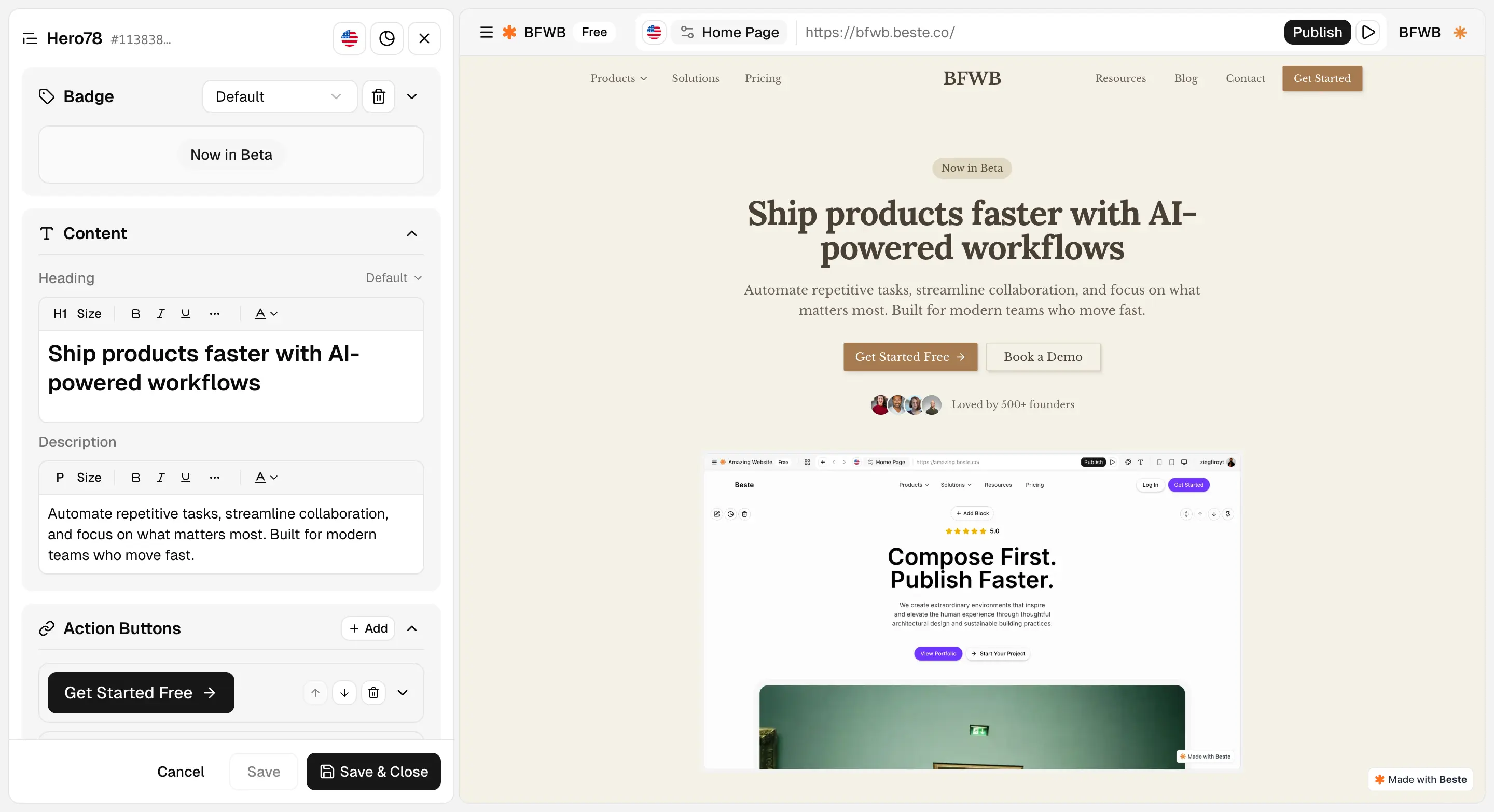
Click a section to preview it, add it to your page, then customize the text, images, and colors to match your brand. Rearranging sections is as simple as dragging them up or down in the page structure. The entire interface is clean and uncluttered, with no deep menu hierarchies or hidden settings panels.
Real-World Build Speed
During our testing, we built a complete multi-page site (home page, about page, services page, blog, and contact page) in just over two hours. That aligns with Beste's reported average of 2.3 hours from signup to publication. The speed gain over drag-and-drop builders is substantial, especially for users who are not professional designers. The tradeoff is clear: you cannot achieve the bespoke, one-of-a-kind layouts that Webflow or Framer make possible. But for the vast majority of business and personal websites, Beste's curated sections produce results that look better than what most people would create on their own with a freeform editor.
Design & Templates
Beste does not use templates in the traditional sense. Where platforms like Wix or Squarespace offer hundreds of pre-built complete website templates that you then modify, Beste provides over 300 individual sections that you assemble into your own unique combination. Think of it like building with high-quality modular furniture rather than buying a pre-furnished room. Each section, whether it is a hero banner with a background video, a three-column feature grid, a testimonial slider, or a minimalist footer, has been professionally designed with careful attention to typography, spacing, color relationships, and visual hierarchy.
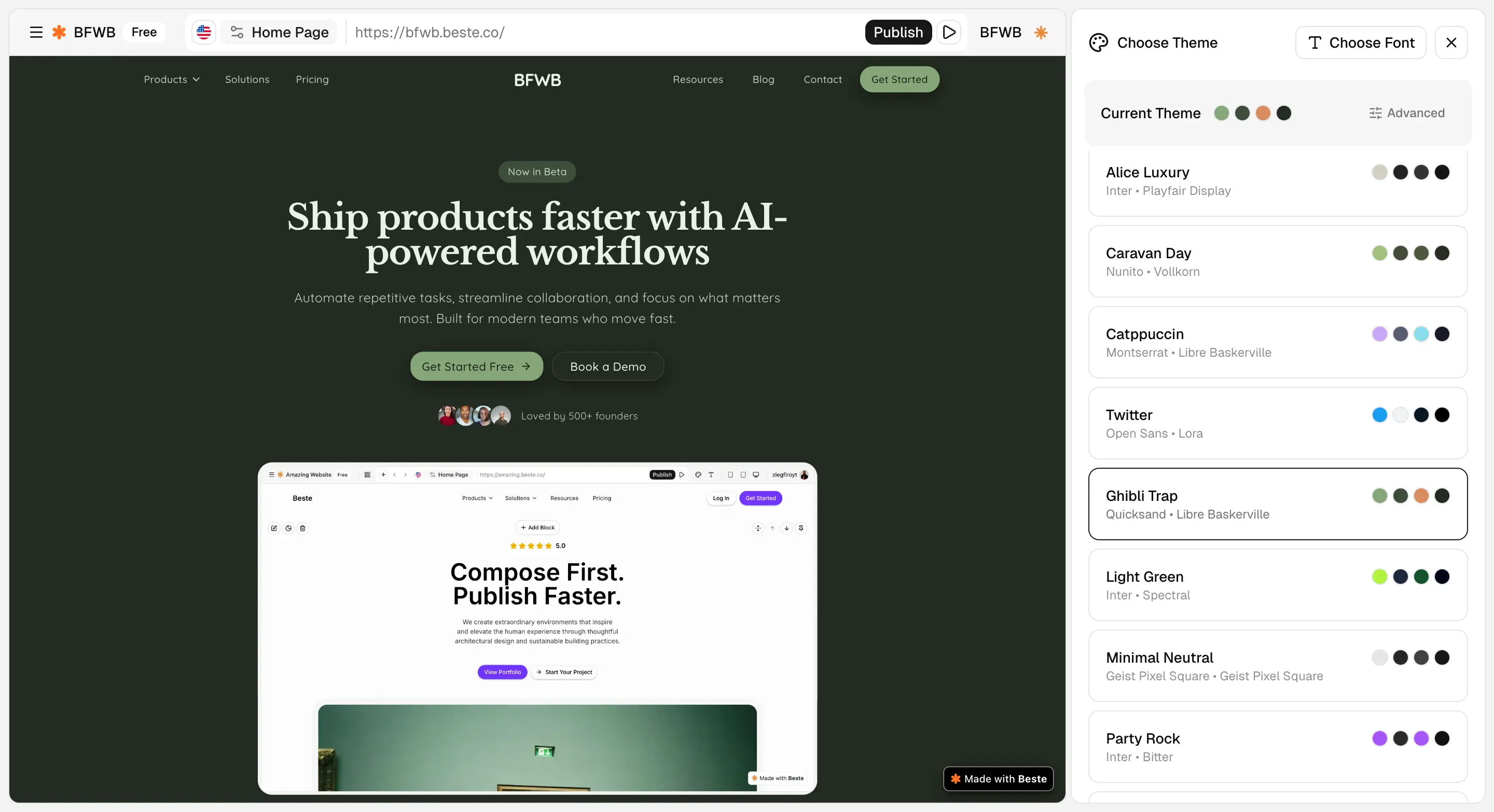
The design quality of these sections is remarkably high. They follow contemporary web design trends without feeling trendy or disposable, and they are consistent enough to mix and match without visual clashes. You can customize colors, fonts, and imagery within each section, and the platform enforces enough design constraints that your customizations are unlikely to produce ugly results. This is a meaningful advantage over drag-and-drop builders, where inexperienced users routinely make design choices that undermine their site's professionalism.
The trade-off, of course, is that you are working within the boundaries of what the section library offers. If you need a completely custom layout that does not correspond to any available section, you cannot create it. The library is extensive enough that this rarely becomes a problem for standard business sites, portfolios, or blogs. Designers with specific creative visions, however, may find the constraints frustrating. Overall, the design system delivers on its promise: professional results without professional design skills, at the cost of some creative flexibility.
Features
Beste includes a well-rounded set of features that cover the core needs of most websites:
- Built-in blogging that integrates naturally into your site's design
- Dynamic forms for contact inquiries, newsletter signups, event registrations, and custom data collection
- Cookie consent management for GDPR and privacy regulation compliance
On the Plus plan, form submissions trigger email notifications, which streamlines response workflows.
Multilingual Support
Multi-language support is a differentiator that many competitors either lack entirely or charge extra for. Beste supports 32 languages out of the box, making it painless to create bilingual or multilingual websites. For businesses serving diverse markets or operating across borders, this capability alone could justify choosing Beste over alternatives.
Plus Plan Integrations
The Plus plan unlocks integrations with Google Analytics, Meta Business Suite, PostHog, Intercom, and Tawk.to, covering analytics, marketing, and customer communication needs. White-label branding on the Plus plan also makes Beste viable for agencies building sites on behalf of clients. Where Beste falls short is in advanced functionality: there are no membership areas, booking systems, or complex content management features. The platform does what it does well, but it is purposefully focused rather than trying to be an all-in-one solution.
SEO Tools
Beste takes a strong foundational approach to SEO. The platform generates clean, semantic HTML markup, which gives search engines a clear understanding of your content structure. This is a meaningful technical advantage over some competitors whose drag-and-drop editors produce bloated, nested markup that can confuse crawlers. Hosting on Vercel's edge network means pages load quickly from servers around the world, and fast page speed is one of Google's most important ranking signals. All sites get automatic SSL certificates, another baseline requirement for modern search rankings.
You can configure standard SEO fields including page titles, meta descriptions, and image alt text. The URL structure is clean and readable, and the curated section library naturally produces well-organized page layouts with proper heading hierarchies. That is something freeform editors often get wrong when users place headings and text blocks without considering document structure. For most small business and personal websites, Beste's SEO tools provide everything needed to rank for local and low-competition keywords.
Beste also includes 301 redirect management (on the Plus plan) and generates an automatic XML sitemap, which are useful for maintaining SEO when restructuring pages or migrating content. The combination of clean code, fast hosting, automatic sitemaps, and standard on-page SEO controls covers the fundamentals well for startups, freelancers, and small businesses.
Ecommerce
Ecommerce is Beste's clearest weakness. The platform does not include any built-in ecommerce functionality: no product catalog, no shopping cart, no checkout flow, and no payment processing. If you need to sell physical or digital products directly from your website, Beste is not the right tool. This is a deliberate product decision that aligns with the platform's focused philosophy, but it does limit Beste's applicability for users who want even basic selling capabilities.
You can work around this gap to some extent by linking to external ecommerce platforms, embedding third-party buy buttons, or directing visitors to a separate storefront. Beste's sections include call-to-action blocks and pricing tables that can link out to payment processors like Stripe or Gumroad. However, this is a patchwork solution rather than a native integration, and it creates friction in the buying experience. If ecommerce is a core requirement, consider platforms like Wix or Squarespace that offer built-in stores on their free or affordable plans. Beste is best suited for informational sites, portfolios, service businesses, and content-driven projects where transactions happen off-site.
Pros and Cons
Pros
- Generous free plan with unlimited pages and custom domain support, rare at this price point
- Composition-first approach eliminates layout mistakes, producing professional results quickly
- 300+ pre-designed sections covering common use cases
- Built-in multilingual support with 32 languages on the free plan
- Hosted on Vercel's edge network with global CDN and SSL included
- Simple two-tier pricing with no confusing feature gating
Cons
- Very new platform with zero third-party reviews or Trustpilot presence, making long-term reliability uncertain
- No drag-and-drop editor: users who want layout flexibility will feel restricted
- No ecommerce functionality at all, not even through a paid plan
- Cannot export your site or self-host: complete platform lock-in
- Cookie consent, analytics integrations, and form notifications locked behind the Plus plan
- Small community with very few third-party tutorials, templates, or resources
Pricing
Beste keeps its pricing simple with just two tiers. The Free plan includes unlimited pages, custom domain support, all 300+ sections, built-in blogging, dynamic forms, multilingual support for 32 languages, cookie consent management, Vercel edge hosting with global CDN and SSL, and no credit card requirement. The free plan includes Beste branding on your site.
The Plus plan costs $9 per month when billed annually (a 40% discount from the $15 per month monthly price). Plus adds analytics integrations (Google Analytics, Meta Business Suite, PostHog), customer communication tools (Intercom, Tawk.to), white-label branding so you can remove Beste's logo, form email notifications, and priority support. The annual plan works out to $108 per year, which is competitive with similar tiers from other builders.
The pricing structure is refreshingly simple compared to platforms like Wix or Squarespace that offer four or five tiers with confusing feature gating. The value proposition is clear: use Beste for free until you need analytics, integrations, or white-label branding, then upgrade to Plus. For agencies building multiple client sites, the white-label option on the Plus plan is especially attractive. The main gap is the absence of an ecommerce tier, which means Beste cannot grow with you if your business eventually needs online selling capabilities.
Final Verdict
Beste is an interesting newcomer that fills a real gap for users who want a professional-looking site without learning design tools. The composition-first approach genuinely works: it is fast, produces consistent results, and the free plan is among the most generous we have tested. However, the platform's newness is a significant caveat. With zero Trustpilot reviews, no presence on major review sites, and complete platform lock-in (no code export), trusting your website to Beste requires a leap of faith that more established platforms do not ask for.
The platform is not for everyone. If you need ecommerce, Beste cannot help you. If you want pixel-level design control and custom interactions, Webflow or Framer remain better choices despite their steeper learning curves. If you need a massive toolkit of plugins, apps, and integrations, Wix or WordPress offer far more extensibility. And if responsive, always-available customer support is critical to you, larger platforms have the edge.
Our score of 3.8 out of 5 reflects a platform with genuine strengths (generous free plan, fast building, good design quality) held back by its unproven track record, complete lock-in, zero ecommerce, and limited advanced features. If you are comfortable with the risk of betting on a new platform and your needs are straightforward (informational site, portfolio, service business), Beste is worth trying. If you need reliability, extensibility, or the reassurance of a well-established platform, stick with more proven alternatives.
Visit BesteFrequently Asked Questions
Is Beste really free?
Can I use a custom domain with Beste's free plan?
What does composition-first mean? How is it different from drag-and-drop?
Is Beste good for SEO?
How does Beste compare to Webflow and Framer?
Does Beste support blogging?
Trustpilot Score
0 reviews on Trustpilot
Beste has no reviews on Trustpilot as of March 2026. The Trustpilot business profile exists but is unclaimed. This is notable because it means there is no independent third-party user feedback available for the platform. We could not find reviews of Beste on any major website builder comparison site either (WebsiteBuilderExpert, Tooltester, SiteBuilderReport, etc.). While the platform may be excellent, the complete absence of external validation is a factor potential users should consider before committing their website to a platform with no public track record.
View Beste on TrustpilotOur Hands-On Experience
We built a multi-page business site on Beste's free plan, including a homepage, about page, services page, blog, and contact page. The composition-first approach genuinely delivers on its speed promise. Browsing the section library, picking blocks, and customizing content felt efficient. We had a credible-looking 5-page site live well under an afternoon, which is faster than most other builders we looked at.
The section quality is consistently high. We assembled a hero, feature grid, testimonial section, pricing table, and FAQ accordion, all of which looked professionally designed without any manual layout work. Connecting a custom domain on the free plan was straightforward and worked within minutes, which is a clear advantage over competitors that lock this behind paywalls.
Customization within sections was more flexible than expected. We could adjust spacing, change layouts, and modify section structures without feeling boxed in. For the vast majority of standard website needs, the section library covered everything we wanted. The main limitation we encountered was that cookie consent management is a Plus-only feature, despite the marketing suggesting it is part of the platform's core offering. For European businesses that need GDPR compliance, this means the free plan is not fully usable without upgrading.
The biggest concern is lock-in. There is no code export option and no way to migrate your site elsewhere. If Beste raises prices, changes terms, or ceases operations, your website goes with it. For a platform with no public track record and zero external reviews, this is a meaningful risk. The platform works well for what it does, but we would recommend treating it as a solution for low-stakes projects until it has built more of a reputation.